

Domains & DNS setup
Live keys send only from verified domains. Add the domain, publish the TXT records ZapSMTP generates for it, and it verifies by itself within a minute of the DKIM record going live. This guide covers every record, every common DNS provider, and what to do when a record will not verify.
- Add the domain in the dashboard under Domains or with POST /domains.
- Publish three TXT records at your DNS provider: DKIM (required), SPF and DMARC (recommended).
- Wait for the check. New domains are checked every minute; or press Verify now / call POST /domains/{id}/verify.
- Send with a live key from any address at that exact domain.
Adding, verifying, changing and deleting domains need a live, full-access key. Test keys can read domains but get 403 test_key_restricted on any change, and restricted keys get 403 restricted_api_key.
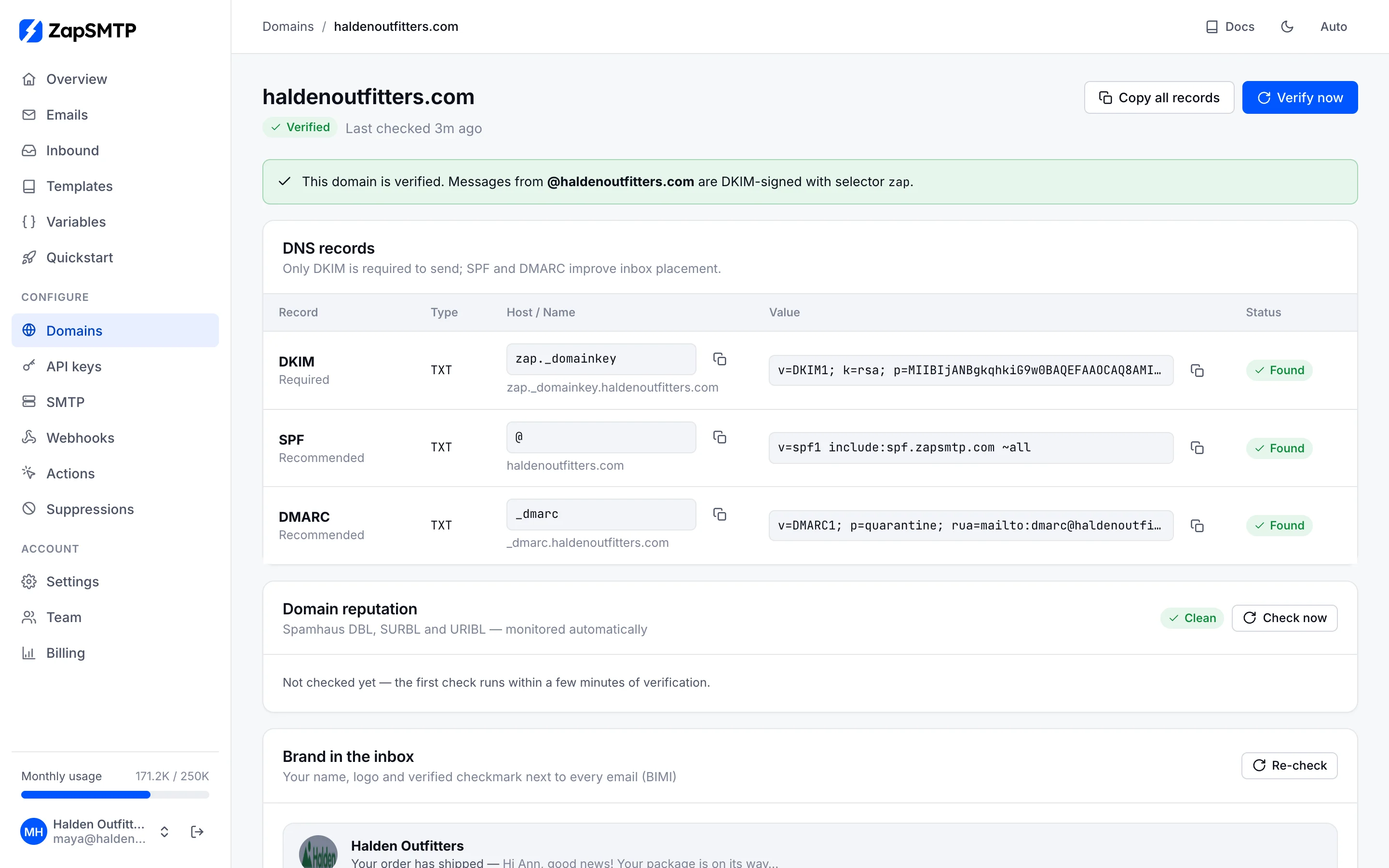
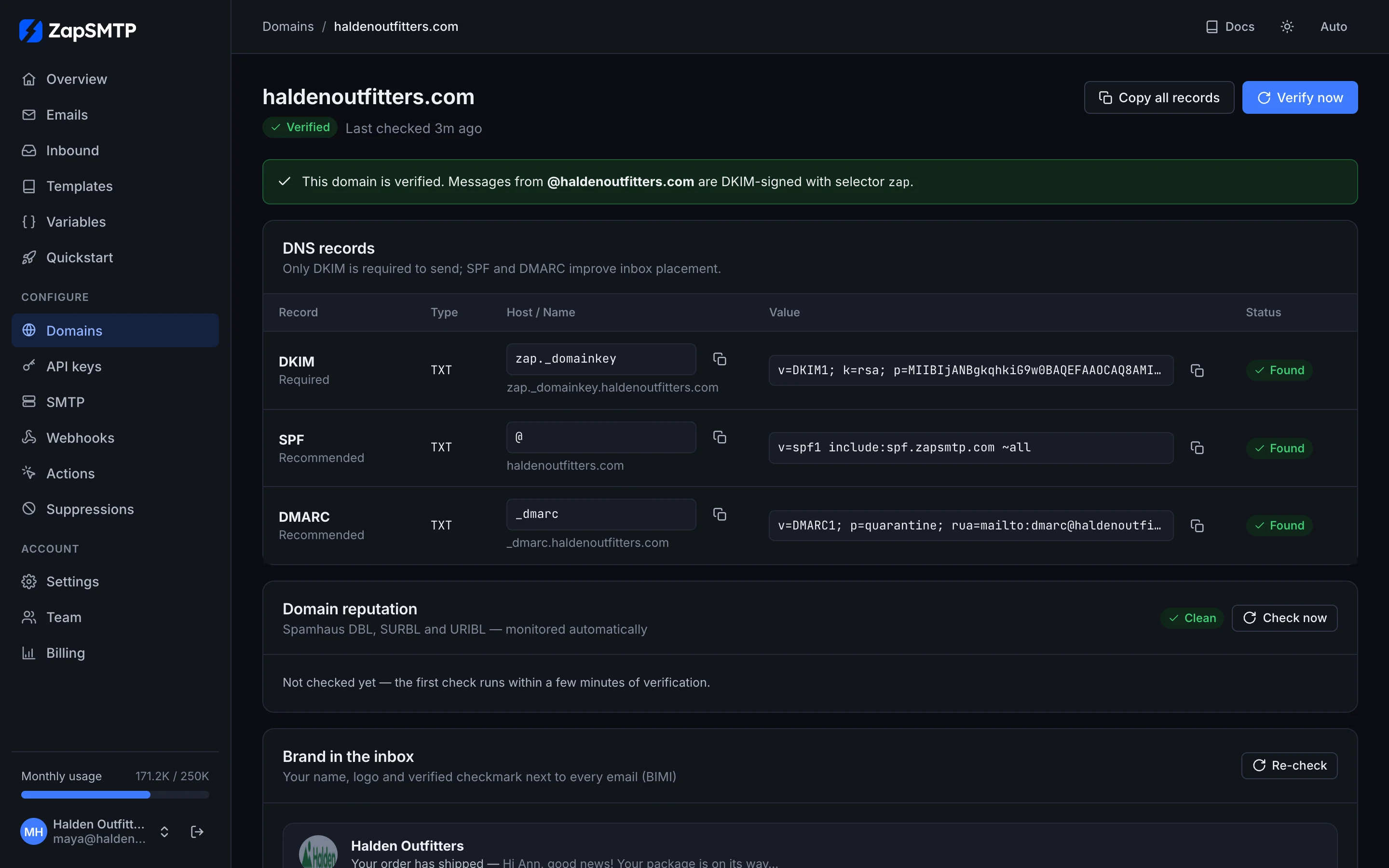
The records
All three are TXT records. Names and values below are for acme.com; yours come back from the API and the dashboard ready to copy.
| DKIM required | Name zap._domainkey.acme.comValue v=DKIM1; k=rsa; p=MIIBIjANBg…IDAQAB |
|---|---|
| SPF recommended | Name acme.comValue v=spf1 include:_spf.zapsmtp.xyz ~all |
| DMARC recommended | Name _dmarc.acme.comValue v=DMARC1; p=none; |
DKIM
When you add a domain we generate a 2048-bit RSA key pair for it. The private key stays with us, encrypted, and signs every message you send from that domain; the public key goes in DNS under the selector zap, so the name is always zap._domainkey.<your domain>. Because the selector is our own, it never collides with DKIM keys of other services (Google Workspace uses google, for example), and you can keep all of them published side by side.
DKIM is the record that proves you control the domain, and the only one required for verification. It is also what makes DMARC pass: the signature is made with your domain, so it is aligned with your From address.
SPF
SPF lists the servers allowed to send for a domain. The bounce address (Return-Path) of messages we send is on a ZapSMTP domain, so receivers evaluate SPF for that domain, which we publish; DMARC then passes through DKIM. The include:_spf.zapsmtp.xyz record on your own domain is still recommended: it authorizes our sending IPs for your domain for receivers and tools that check the From domain, and it is reported as its own status. A domain can have only one SPF record.
DMARC
DMARC tells receivers what to do with mail that claims to be from your domain but fails authentication, and where to send reports about it. We suggest p=none to start: it changes nothing about delivery and turns on reporting. Gmail and Yahoo expect a DMARC record from bulk senders, and brand logos need an enforcing policy. See DMARC rollout for the path to p=reject.
A subdomain without its own DMARC record inherits the policy of its parent domain. If _dmarc.acme.com exists, mail.acme.com passes the DMARC check without publishing _dmarc.mail.acme.com; the API shows it as (inherited from _dmarc.acme.com).
Root domain or a sending subdomain
A verified domain covers exactly that name. Verifying acme.com lets you send from …@acme.com, not from …@mail.acme.com; that is a separate domain to add and verify.
| Root acme.com | Pros: the address people recognise; replies go to your normal mailboxes; one set of records. Cons: its reputation is shared with your staff mail and every other service sending as acme.com; the SPF record must be merged with the one you already have. |
|---|---|
| Subdomain mail.acme.com | Pros: keeps product or marketing mail apart from staff mail, so a bad campaign does not hurt your team’s inbox placement; its own SPF record, with no merging; easy to split further (news., notify.).Cons: recipients see the subdomain; replies need a mailbox or reply routing; reputation still partly follows the parent domain. |
For a subdomain the records go in the same DNS zone as the parent. The zone field of the response names that zone (for mail.acme.co.uk it is acme.co.uk), and the host to type at most providers is the part before it.
| DKIM | Full name zap._domainkey.mail.acme.com, host zap._domainkey.mail |
|---|---|
| SPF | Full name mail.acme.com, host mail |
| DMARC | Full name _dmarc.mail.acme.com, host _dmarc.mail (optional when _dmarc.acme.com exists) |
Add the root domain
POST/v1/domains
Send as hello@acme.com. The response carries a fresh DKIM key and all three records to publish.
Requires a full-access live key; test keys get 403 test_key_restricted.
Body parameters
namestringrequired- Domain name (lowercased, trailing dot removed). Limits: valid hostname <=253 chars, else 422 invalid_parameter "invalid domain name"
Errors
plan_limit_reachedHTTP 403- the <Plan> plan includes <n> domains; upgrade your plan to add more
restricted_api_keyHTTP 403test_key_restrictedHTTP 403- test-mode keys can send test email and read, not change the account: use a live key
conflictHTTP 409- domain already added
invalid_parameterHTTP 422- invalid domain name
curl -X POST 'https://zapsmtp.xyz/v1/domains' \
  -H "Authorization: Bearer $ZAP_API_KEY" \
  -H 'Content-Type: application/json' \
  -d '{
  "name": "acme.com"
}'
const res = await fetch('https://zapsmtp.xyz/v1/domains', {
method: 'POST',
headers: {
Authorization: `Bearer ${process.env.ZAP_API_KEY}`,
'Content-Type': 'application/json',
},
body: JSON.stringify({
"name": "acme.com"
}),
});
// 204 No Content (e.g. a delete) has no body
const data = res.status === 204 ? null : await res.json();
if (!res.ok) throw new Error(`${data.name}: ${data.message}`);
console.log(data);import os
import requests
res = requests.post(
"https://zapsmtp.xyz/v1/domains",
headers={"Authorization": f"Bearer {os.environ['ZAP_API_KEY']}"},
json={
"name": "acme.com",
},
timeout=30,
)
res.raise_for_status()
print(res.json() if res.status_code != 204 else "deleted")<?php
$ch = curl_init('https://zapsmtp.xyz/v1/domains');
curl_setopt_array($ch, [
CURLOPT_CUSTOMREQUEST => 'POST',
CURLOPT_RETURNTRANSFER => true,
CURLOPT_HTTPHEADER => [
'Authorization: Bearer ' . getenv('ZAP_API_KEY'),
'Content-Type: application/json',
],
CURLOPT_POSTFIELDS => json_encode([
'name' => 'acme.com',
]),
]);
$data = json_decode(curl_exec($ch), true);
$status = curl_getinfo($ch, CURLINFO_RESPONSE_CODE);
if ($status >= 400) {
throw new RuntimeException($data['message']);
}
print_r($data);package main
import (
"fmt"
"io"
"net/http"
"os"
"strings"
)
func main() {
body := strings.NewReader(`{
"name": "acme.com"
}`)
req, err := http.NewRequest(
"POST",
"https://zapsmtp.xyz/v1/domains",
body,
)
if err != nil {
panic(err)
}
req.Header.Set("Authorization", "Bearer "+os.Getenv("ZAP_API_KEY"))
req.Header.Set("Content-Type", "application/json")
res, err := http.DefaultClient.Do(req)
if err != nil {
panic(err)
}
defer res.Body.Close()
out, _ := io.ReadAll(res.Body)
fmt.Println(res.Status, string(out))
}require 'net/http'
require 'json'
uri = URI('https://zapsmtp.xyz/v1/domains')
req = Net::HTTP::Post.new(uri)
req['Authorization'] = "Bearer #{ENV.fetch('ZAP_API_KEY')}"
req['Content-Type'] = 'application/json'
req.body = {
name: "acme.com"
}.to_json
res = Net::HTTP.start(uri.host, uri.port, use_ssl: true) { |http| http.request(req) }
puts res.code, (JSON.parse(res.body) unless res.body.to_s.empty?)import java.net.URI;
import java.net.http.*;
public class ZapRequest {
public static void main(String[] args) throws Exception {
var request = HttpRequest.newBuilder(URI.create("https://zapsmtp.xyz/v1/domains"))
.header("Authorization", "Bearer " + System.getenv("ZAP_API_KEY"))
.header("Content-Type", "application/json")
.method("POST", HttpRequest.BodyPublishers.ofString("""
{
"name": "acme.com"
}"""))
.build();
var response = HttpClient.newHttpClient()
.send(request, HttpResponse.BodyHandlers.ofString());
System.out.println(response.statusCode() + " " + response.body());
}
}using System.Net.Http.Headers;
using System.Text;
using var http = new HttpClient();
var request = new HttpRequestMessage(HttpMethod.Post, "https://zapsmtp.xyz/v1/domains");
request.Headers.Authorization = new AuthenticationHeaderValue(
"Bearer", Environment.GetEnvironmentVariable("ZAP_API_KEY"));
request.Content = new StringContent("""
{
"name": "acme.com"
}
""", Encoding.UTF8, "application/json");
var response = await http.SendAsync(request);
Console.WriteLine($"{(int)response.StatusCode} {await response.Content.ReadAsStringAsync()}");ZAP_API_KEY in your environment.Response 201 Created
{
  "id": "019a1f10-8a10-7b22-8c31-5d2e9f0a4b17",
  "name": "acme.com",
  "status": "pending",
  "dkim_selector": "zap",
  "dkim_verified": false,
  "spf_verified": false,
  "dmarc_verified": false,
  "open_tracking": false,
  "click_tracking": false,
  "from_name": "",
  "tls": "opportunistic",
  "reply_tracking": false,
  "reply_domain": "",
  "reply_forward_to": "",
  "brand_updated_at": null,
  "last_checked_at": null,
  "verified_at": null,
  "created_at": "2026-10-21T13:58:02Z",
  "zone": "acme.com",
  "records": [
    {
      "record": "DKIM",
      "type": "TXT",
      "name": "zap._domainkey.acme.com",
      "value": "v=DKIM1; k=rsa; p=MIIBIjANBgkqhkiG9w0BAQEFAAOCAQ8AMIIBCgKCAQEA...",
      "required": true,
      "status": "pending"
    },
    {
      "record": "SPF",
      "type": "TXT",
      "name": "acme.com",
      "value": "v=spf1 include:_spf.zapsmtp.xyz ~all",
      "required": false,
      "status": "pending"
    },
    {
      "record": "DMARC",
      "type": "TXT",
      "name": "_dmarc.acme.com",
      "value": "v=DMARC1; p=none;",
      "required": false,
      "status": "pending"
    }
  ]
}
Add a sending subdomain
POST/v1/domains
Send as hello@mail.acme.com. Records are generated for the subdomain; the zone field names the DNS zone they go in.
Requires a full-access live key; test keys get 403 test_key_restricted.
Body parameters
namestringrequired- Domain name (lowercased, trailing dot removed). Limits: valid hostname <=253 chars, else 422 invalid_parameter "invalid domain name"
Errors
plan_limit_reachedHTTP 403- the <Plan> plan includes <n> domains; upgrade your plan to add more
restricted_api_keyHTTP 403test_key_restrictedHTTP 403- test-mode keys can send test email and read, not change the account: use a live key
conflictHTTP 409- domain already added
invalid_parameterHTTP 422- invalid domain name
curl -X POST 'https://zapsmtp.xyz/v1/domains' \
  -H "Authorization: Bearer $ZAP_API_KEY" \
  -H 'Content-Type: application/json' \
  -d '{
  "name": "mail.acme.com"
}'
const res = await fetch('https://zapsmtp.xyz/v1/domains', {
method: 'POST',
headers: {
Authorization: `Bearer ${process.env.ZAP_API_KEY}`,
'Content-Type': 'application/json',
},
body: JSON.stringify({
"name": "mail.acme.com"
}),
});
// 204 No Content (e.g. a delete) has no body
const data = res.status === 204 ? null : await res.json();
if (!res.ok) throw new Error(`${data.name}: ${data.message}`);
console.log(data);import os
import requests
res = requests.post(
"https://zapsmtp.xyz/v1/domains",
headers={"Authorization": f"Bearer {os.environ['ZAP_API_KEY']}"},
json={
"name": "mail.acme.com",
},
timeout=30,
)
res.raise_for_status()
print(res.json() if res.status_code != 204 else "deleted")<?php
$ch = curl_init('https://zapsmtp.xyz/v1/domains');
curl_setopt_array($ch, [
CURLOPT_CUSTOMREQUEST => 'POST',
CURLOPT_RETURNTRANSFER => true,
CURLOPT_HTTPHEADER => [
'Authorization: Bearer ' . getenv('ZAP_API_KEY'),
'Content-Type: application/json',
],
CURLOPT_POSTFIELDS => json_encode([
'name' => 'mail.acme.com',
]),
]);
$data = json_decode(curl_exec($ch), true);
$status = curl_getinfo($ch, CURLINFO_RESPONSE_CODE);
if ($status >= 400) {
throw new RuntimeException($data['message']);
}
print_r($data);package main
import (
"fmt"
"io"
"net/http"
"os"
"strings"
)
func main() {
body := strings.NewReader(`{
"name": "mail.acme.com"
}`)
req, err := http.NewRequest(
"POST",
"https://zapsmtp.xyz/v1/domains",
body,
)
if err != nil {
panic(err)
}
req.Header.Set("Authorization", "Bearer "+os.Getenv("ZAP_API_KEY"))
req.Header.Set("Content-Type", "application/json")
res, err := http.DefaultClient.Do(req)
if err != nil {
panic(err)
}
defer res.Body.Close()
out, _ := io.ReadAll(res.Body)
fmt.Println(res.Status, string(out))
}require 'net/http'
require 'json'
uri = URI('https://zapsmtp.xyz/v1/domains')
req = Net::HTTP::Post.new(uri)
req['Authorization'] = "Bearer #{ENV.fetch('ZAP_API_KEY')}"
req['Content-Type'] = 'application/json'
req.body = {
name: "mail.acme.com"
}.to_json
res = Net::HTTP.start(uri.host, uri.port, use_ssl: true) { |http| http.request(req) }
puts res.code, (JSON.parse(res.body) unless res.body.to_s.empty?)import java.net.URI;
import java.net.http.*;
public class ZapRequest {
public static void main(String[] args) throws Exception {
var request = HttpRequest.newBuilder(URI.create("https://zapsmtp.xyz/v1/domains"))
.header("Authorization", "Bearer " + System.getenv("ZAP_API_KEY"))
.header("Content-Type", "application/json")
.method("POST", HttpRequest.BodyPublishers.ofString("""
{
"name": "mail.acme.com"
}"""))
.build();
var response = HttpClient.newHttpClient()
.send(request, HttpResponse.BodyHandlers.ofString());
System.out.println(response.statusCode() + " " + response.body());
}
}using System.Net.Http.Headers;
using System.Text;
using var http = new HttpClient();
var request = new HttpRequestMessage(HttpMethod.Post, "https://zapsmtp.xyz/v1/domains");
request.Headers.Authorization = new AuthenticationHeaderValue(
"Bearer", Environment.GetEnvironmentVariable("ZAP_API_KEY"));
request.Content = new StringContent("""
{
"name": "mail.acme.com"
}
""", Encoding.UTF8, "application/json");
var response = await http.SendAsync(request);
Console.WriteLine($"{(int)response.StatusCode} {await response.Content.ReadAsStringAsync()}");ZAP_API_KEY in your environment.Response 201 Created
{
  "id": "019a1f10-8a10-7b22-8c31-5d2e9f0a4b17",
  "name": "mail.acme.com",
  "status": "pending",
  "dkim_selector": "zap",
  "dkim_verified": false,
  "spf_verified": false,
  "dmarc_verified": false,
  "open_tracking": false,
  "click_tracking": false,
  "from_name": "",
  "tls": "opportunistic",
  "reply_tracking": false,
  "reply_domain": "",
  "reply_forward_to": "",
  "brand_updated_at": null,
  "last_checked_at": null,
  "verified_at": null,
  "created_at": "2026-10-21T13:58:02Z",
  "zone": "acme.com",
  "records": [
    {
      "record": "DKIM",
      "type": "TXT",
      "name": "zap._domainkey.mail.acme.com",
      "value": "v=DKIM1; k=rsa; p=MIIBIjANBgkqhkiG9w0BAQEFAAOCAQ8AMIIBCgKCAQEA...",
      "required": true,
      "status": "pending"
    },
    {
      "record": "SPF",
      "type": "TXT",
      "name": "mail.acme.com",
      "value": "v=spf1 include:_spf.zapsmtp.xyz ~all",
      "required": false,
      "status": "pending"
    },
    {
      "record": "DMARC",
      "type": "TXT",
      "name": "_dmarc.mail.acme.com",
      "value": "v=DMARC1; p=none;",
      "required": false,
      "status": "pending"
    }
  ]
}
Fetch the records again
GET/v1/domains/{id}
The records array is regenerated on every read, so you can always copy the exact values. Each record has its own status.
Requires a full-access key.
Path parameters
idstringrequired- Domain id
Errors
restricted_api_keyHTTP 403not_foundHTTP 404- domain not found
curl 'https://zapsmtp.xyz/v1/domains/019a1e9b-41c2-7a0e-b5d1-3f6c2e8a9d47' \
  -H "Authorization: Bearer $ZAP_API_KEY"
const res = await fetch('https://zapsmtp.xyz/v1/domains/019a1e9b-41c2-7a0e-b5d1-3f6c2e8a9d47', {
method: 'GET',
headers: {
Authorization: `Bearer ${process.env.ZAP_API_KEY}`,
},
});
// 204 No Content (e.g. a delete) has no body
const data = res.status === 204 ? null : await res.json();
if (!res.ok) throw new Error(`${data.name}: ${data.message}`);
console.log(data);import os
import requests
res = requests.get(
"https://zapsmtp.xyz/v1/domains/019a1e9b-41c2-7a0e-b5d1-3f6c2e8a9d47",
headers={"Authorization": f"Bearer {os.environ['ZAP_API_KEY']}"},
timeout=30,
)
res.raise_for_status()
print(res.json() if res.status_code != 204 else "deleted")<?php
$ch = curl_init('https://zapsmtp.xyz/v1/domains/019a1e9b-41c2-7a0e-b5d1-3f6c2e8a9d47');
curl_setopt_array($ch, [
CURLOPT_CUSTOMREQUEST => 'GET',
CURLOPT_RETURNTRANSFER => true,
CURLOPT_HTTPHEADER => [
'Authorization: Bearer ' . getenv('ZAP_API_KEY'),
],
]);
$data = json_decode(curl_exec($ch), true);
$status = curl_getinfo($ch, CURLINFO_RESPONSE_CODE);
if ($status >= 400) {
throw new RuntimeException($data['message']);
}
print_r($data);package main
import (
"fmt"
"io"
"net/http"
"os"
)
func main() {
req, err := http.NewRequest(
"GET",
"https://zapsmtp.xyz/v1/domains/019a1e9b-41c2-7a0e-b5d1-3f6c2e8a9d47",
nil,
)
if err != nil {
panic(err)
}
req.Header.Set("Authorization", "Bearer "+os.Getenv("ZAP_API_KEY"))
res, err := http.DefaultClient.Do(req)
if err != nil {
panic(err)
}
defer res.Body.Close()
out, _ := io.ReadAll(res.Body)
fmt.Println(res.Status, string(out))
}require 'net/http'
require 'json'
uri = URI('https://zapsmtp.xyz/v1/domains/019a1e9b-41c2-7a0e-b5d1-3f6c2e8a9d47')
req = Net::HTTP::Get.new(uri)
req['Authorization'] = "Bearer #{ENV.fetch('ZAP_API_KEY')}"
res = Net::HTTP.start(uri.host, uri.port, use_ssl: true) { |http| http.request(req) }
puts res.code, (JSON.parse(res.body) unless res.body.to_s.empty?)import java.net.URI;
import java.net.http.*;
public class ZapRequest {
public static void main(String[] args) throws Exception {
var request = HttpRequest.newBuilder(URI.create("https://zapsmtp.xyz/v1/domains/019a1e9b-41c2-7a0e-b5d1-3f6c2e8a9d47"))
.header("Authorization", "Bearer " + System.getenv("ZAP_API_KEY"))
.method("GET", HttpRequest.BodyPublishers.noBody())
.build();
var response = HttpClient.newHttpClient()
.send(request, HttpResponse.BodyHandlers.ofString());
System.out.println(response.statusCode() + " " + response.body());
}
}using System.Net.Http.Headers;
using System.Text;
using var http = new HttpClient();
var request = new HttpRequestMessage(HttpMethod.Get, "https://zapsmtp.xyz/v1/domains/019a1e9b-41c2-7a0e-b5d1-3f6c2e8a9d47");
request.Headers.Authorization = new AuthenticationHeaderValue(
"Bearer", Environment.GetEnvironmentVariable("ZAP_API_KEY"));
var response = await http.SendAsync(request);
Console.WriteLine($"{(int)response.StatusCode} {await response.Content.ReadAsStringAsync()}");ZAP_API_KEY in your environment.Response 200.
Adding the records at your DNS provider
Add records where your domain’s nameservers point, which is not always where you bought it. Run dig +short NS acme.com (or check your registrar) to see which provider answers for the domain. The rules that apply everywhere:
- Host field. Most providers append your domain to what you type. Enter
zap._domainkey, notzap._domainkey.acme.com, or the record ends up atzap._domainkey.acme.com.acme.com. Use@(or leave the field empty, depending on the provider) for the root. - Quotes. Paste the value without surrounding quotes unless the provider requires them (Route 53 and zone files do). Quotes kept literally inside the value break it.
- Long DKIM values. The key is longer than the 255-character limit of one TXT string. Most web consoles split it for you; where they do not, enter it as several quoted strings in one record. Receivers join them back without spaces.
- TTL. Any value works. Verification asks your nameservers directly, so a long TTL does not delay it; it only matters for how long old values stay in other resolvers’ caches after a change.
Cloudflare
- Open the domain, then DNS → Records → Add record.
- Type
TXT, Namezap._domainkey(Cloudflare accepts the short host or the full name), Content: the DKIM value. Save. - Repeat with Name
@for SPF and_dmarcfor DMARC.
TXT records have no proxy setting in Cloudflare, so the orange cloud is not involved; none of our records is a CNAME. If you already have v=spf1 at @, edit that record instead of adding a second one.
GoDaddy
- Domain Portfolio → your domain → DNS → Add New Record.
- Type
TXT, Namezap._domainkey, Value: the DKIM value. Save. - SPF: Name
@; DMARC: Name_dmarc.
GoDaddy appends the domain to the Name. New domains often come with a default _dmarc record; edit it rather than adding another.
Amazon Route 53
- Hosted zones → your domain → Create record.
- Record name
zap._domainkey(the console shows the domain suffix next to the field), Record typeTXT. - Value: wrap it in double quotes. For the DKIM key, split it into quoted strings of up to 255 characters on one line, as below.
- SPF: leave Record name empty for the root. DMARC:
_dmarc.
Route 53 holds one TXT record set per name. If the root already has TXT values (an existing SPF, a site verification token), edit that record set and put each value on its own line, each in its own quotes.
"v=DKIM1; k=rsa; p=MIIBIjANBgkqhkiG9w0BAQEFAAOCAQ8AMIIBCgKCAQEAxq3…first 255 characters…" "…the rest of the key…IDAQAB"$ORIGIN acme.com.
zap._domainkey 3600 IN TXT ( "v=DKIM1; k=rsa; p=MIIBIjANBgkqhkiG9w0BAQEFAAOC…"
"…the rest of the key…IDAQAB" )
@ 3600 IN TXT "v=spf1 include:_spf.zapsmtp.xyz ~all"
_dmarc 3600 IN TXT "v=DMARC1; p=none;"Namecheap
- Domain List → Manage → Advanced DNS → Add New Record → TXT Record.
- Host
zap._domainkey, Value: the DKIM value. Save with the check mark. - SPF: Host
@; DMARC: Host_dmarc.
These records only take effect while the domain uses Namecheap’s nameservers. If it points to another provider (Cloudflare, for example), add them there.
Google Cloud DNS and Squarespace Domains
Cloud DNS: Network services → Cloud DNS → your zone → Add standard (record set). DNS name zap._domainkey (the zone’s suffix is filled in), Resource record type TXT, TXT data: the value. Put several values for one name, such as two TXT strings at the root, in the same record set.
Squarespace Domains (formerly Google Domains): your domain → DNS → DNS settings → Custom records → Add record. Host zap._domainkey, Type TXT, Data: the value. Use @ for the root.
DigitalOcean
- Networking → Domains → your domain → Create new record → TXT.
- Hostname
zap._domainkey(the domain is appended), Value: the DKIM value. - SPF: Hostname
@; DMARC:_dmarc.
As with every hosted DNS, this works only if the domain’s nameservers are DigitalOcean’s.
Any other provider
Look for DNS, Zone editor or Advanced DNS, add three TXT records and check with dig that the full names match the table above. If the provider imports zone files, the BIND tab above works as is.
If you already have an SPF record
A domain may publish only one TXT record that starts with v=spf1. With two, receivers return a permanent error and treat SPF as failed for every service on the domain. Add our include to the record you have, before the final ~all or -all, and keep its existing qualifier. The verify response warns when it finds more than one SPF record. Note that SPF can still show verified in that case, because our check only looks for the include in any of them; the warning is what tells you receivers will fail it.
acme.com.  TXT  "v=spf1 include:_spf.google.com ~all"
acme.com.  TXT  "v=spf1 include:_spf.zapsmtp.xyz ~all"
acme.com. TXT "v=spf1 include:_spf.google.com include:_spf.zapsmtp.xyz ~all"; keep the existing qualifier; only add the include before it
acme.com. TXT "v=spf1 ip4:192.0.2.0/24 include:_spf.google.com include:_spf.zapsmtp.xyz -all"The 10-lookup limit. SPF allows at most 10 DNS lookups while evaluating a record: every include, a, mx, exists and redirect counts, including those nested inside includes. Past ten the result is a permanent error. If adding our include crosses the limit, remove services you no longer use, replace a/mx with explicit ip4/ip6 ranges where they are stable, or move this mail to a sending subdomain with its own short record.
Verification
A domain is verified as soon as its DKIM record contains the public key we generated. SPF and DMARC do not block verification; they are reported separately. The check:
- runs automatically every minute for pending domains, for 72 hours after you add them. After that, press Verify now in the dashboard or call the verify endpoint;
- asks your domain’s authoritative nameservers directly (the one with the newest zone serial), so a record is seen seconds after your provider publishes it, regardless of TTL; it falls back to public resolvers;
- compares DKIM ignoring whitespace, so a key split into several strings matches; SPF passes when a record starting with
v=spf1containsinclude:_spf.zapsmtp.xyz; DMARC passes when_dmarc.<domain>, or the parent domain’s, starts withv=DMARC1, whatever the policy.
status | pending until DKIM matches, then verified. verified_at is when that first happened. |
|---|---|
dkim_verified, spf_verified, dmarc_verified | The result of the latest check for each record; also as records[].status (pending or verified). |
last_checked_at | When DNS was last checked; null before the first check. |
found verify only | What is published right now under each name, to compare with the expected value. At the root only SPF values are listed. |
warnings verify only | Problems that do not block verification, such as several SPF records. |
Once verified, a domain stays verified: a later check updates the per-record flags but does not take sending away. Keep the DKIM record published anyway; without it, receivers fail DKIM and DMARC on every message. A domain can be verified by one account at a time; verifying it elsewhere returns 409 conflict.
Check DNS now
POST/v1/domains/{id}/verify
Runs the same check as the automatic one and returns what was found under each name, plus warnings such as duplicate SPF records.
Requires a full-access live key; test keys get 403 test_key_restricted.
found shows, per DNS name, what is published right now. For the root domain only SPF-type TXT values are listed; a DMARC policy inherited from the parent domain is marked “(inherited from _dmarc.<domain>)”.
Path parameters
idstringrequired- Domain id
Errors
restricted_api_keyHTTP 403test_key_restrictedHTTP 403- test-mode keys can send test email and read, not change the account: use a live key
not_foundHTTP 404- domain not found
conflictHTTP 409- this domain is already verified by another account
curl -X POST 'https://zapsmtp.xyz/v1/domains/019a1e9b-41c2-7a0e-b5d1-3f6c2e8a9d47/verify' \
  -H "Authorization: Bearer $ZAP_API_KEY"
const res = await fetch('https://zapsmtp.xyz/v1/domains/019a1e9b-41c2-7a0e-b5d1-3f6c2e8a9d47/verify', {
method: 'POST',
headers: {
Authorization: `Bearer ${process.env.ZAP_API_KEY}`,
},
});
// 204 No Content (e.g. a delete) has no body
const data = res.status === 204 ? null : await res.json();
if (!res.ok) throw new Error(`${data.name}: ${data.message}`);
console.log(data);import os
import requests
res = requests.post(
"https://zapsmtp.xyz/v1/domains/019a1e9b-41c2-7a0e-b5d1-3f6c2e8a9d47/verify",
headers={"Authorization": f"Bearer {os.environ['ZAP_API_KEY']}"},
timeout=30,
)
res.raise_for_status()
print(res.json() if res.status_code != 204 else "deleted")<?php
$ch = curl_init('https://zapsmtp.xyz/v1/domains/019a1e9b-41c2-7a0e-b5d1-3f6c2e8a9d47/verify');
curl_setopt_array($ch, [
CURLOPT_CUSTOMREQUEST => 'POST',
CURLOPT_RETURNTRANSFER => true,
CURLOPT_HTTPHEADER => [
'Authorization: Bearer ' . getenv('ZAP_API_KEY'),
],
]);
$data = json_decode(curl_exec($ch), true);
$status = curl_getinfo($ch, CURLINFO_RESPONSE_CODE);
if ($status >= 400) {
throw new RuntimeException($data['message']);
}
print_r($data);package main
import (
"fmt"
"io"
"net/http"
"os"
)
func main() {
req, err := http.NewRequest(
"POST",
"https://zapsmtp.xyz/v1/domains/019a1e9b-41c2-7a0e-b5d1-3f6c2e8a9d47/verify",
nil,
)
if err != nil {
panic(err)
}
req.Header.Set("Authorization", "Bearer "+os.Getenv("ZAP_API_KEY"))
res, err := http.DefaultClient.Do(req)
if err != nil {
panic(err)
}
defer res.Body.Close()
out, _ := io.ReadAll(res.Body)
fmt.Println(res.Status, string(out))
}require 'net/http'
require 'json'
uri = URI('https://zapsmtp.xyz/v1/domains/019a1e9b-41c2-7a0e-b5d1-3f6c2e8a9d47/verify')
req = Net::HTTP::Post.new(uri)
req['Authorization'] = "Bearer #{ENV.fetch('ZAP_API_KEY')}"
res = Net::HTTP.start(uri.host, uri.port, use_ssl: true) { |http| http.request(req) }
puts res.code, (JSON.parse(res.body) unless res.body.to_s.empty?)import java.net.URI;
import java.net.http.*;
public class ZapRequest {
public static void main(String[] args) throws Exception {
var request = HttpRequest.newBuilder(URI.create("https://zapsmtp.xyz/v1/domains/019a1e9b-41c2-7a0e-b5d1-3f6c2e8a9d47/verify"))
.header("Authorization", "Bearer " + System.getenv("ZAP_API_KEY"))
.method("POST", HttpRequest.BodyPublishers.noBody())
.build();
var response = HttpClient.newHttpClient()
.send(request, HttpResponse.BodyHandlers.ofString());
System.out.println(response.statusCode() + " " + response.body());
}
}using System.Net.Http.Headers;
using System.Text;
using var http = new HttpClient();
var request = new HttpRequestMessage(HttpMethod.Post, "https://zapsmtp.xyz/v1/domains/019a1e9b-41c2-7a0e-b5d1-3f6c2e8a9d47/verify");
request.Headers.Authorization = new AuthenticationHeaderValue(
"Bearer", Environment.GetEnvironmentVariable("ZAP_API_KEY"));
var response = await http.SendAsync(request);
Console.WriteLine($"{(int)response.StatusCode} {await response.Content.ReadAsStringAsync()}");ZAP_API_KEY in your environment.Response 200 OK
{
  "id": "019a1f10-8a10-7b22-8c31-5d2e9f0a4b17",
  "name": "acme.com",
  "status": "verified",
  "dkim_selector": "zap",
  "dkim_verified": true,
  "spf_verified": true,
  "dmarc_verified": false,
  "open_tracking": false,
  "click_tracking": false,
  "from_name": "",
  "tls": "opportunistic",
  "reply_tracking": false,
  "reply_domain": "",
  "reply_forward_to": "",
  "brand_updated_at": null,
  "last_checked_at": "2026-10-21T14:02:11Z",
  "verified_at": "2026-10-21T14:02:11Z",
  "created_at": "2026-10-21T13:58:02Z",
  "zone": "acme.com",
  "records": [
    {
      "record": "DKIM",
      "type": "TXT",
      "name": "zap._domainkey.acme.com",
      "value": "v=DKIM1; k=rsa; p=MIIBIjANBgkqhkiG9w0BAQEFAAOCAQ8AMIIBCgKCAQEA...",
      "required": true,
      "status": "verified"
    },
    {
      "record": "SPF",
      "type": "TXT",
      "name": "acme.com",
      "value": "v=spf1 include:_spf.zapsmtp.xyz ~all",
      "required": false,
      "status": "verified"
    },
    {
      "record": "DMARC",
      "type": "TXT",
      "name": "_dmarc.acme.com",
      "value": "v=DMARC1; p=none;",
      "required": false,
      "status": "pending"
    }
  ],
  "found": {
    "zap._domainkey.acme.com": [
      "v=DKIM1; k=rsa; p=MIIBIjANBgkqhkiG9w0BAQEFAAOCAQ8AMIIBCgKCAQEA..."
    ],
    "acme.com": [
      "v=spf1 include:_spf.zapsmtp.xyz ~all"
    ]
  }
}
List every domain and its status
GET/v1/domains
Newest first. Useful for a deploy check that every From domain your app uses is verified.
Requires a full-access key.
status is pending or verified. Only DKIM is required to verify a domain; SPF and DMARC are recommended and reported separately.
Errors
restricted_api_keyHTTP 403
curl 'https://zapsmtp.xyz/v1/domains' \
  -H "Authorization: Bearer $ZAP_API_KEY"
const res = await fetch('https://zapsmtp.xyz/v1/domains', {
method: 'GET',
headers: {
Authorization: `Bearer ${process.env.ZAP_API_KEY}`,
},
});
// 204 No Content (e.g. a delete) has no body
const data = res.status === 204 ? null : await res.json();
if (!res.ok) throw new Error(`${data.name}: ${data.message}`);
console.log(data);import os
import requests
res = requests.get(
"https://zapsmtp.xyz/v1/domains",
headers={"Authorization": f"Bearer {os.environ['ZAP_API_KEY']}"},
timeout=30,
)
res.raise_for_status()
print(res.json() if res.status_code != 204 else "deleted")<?php
$ch = curl_init('https://zapsmtp.xyz/v1/domains');
curl_setopt_array($ch, [
CURLOPT_CUSTOMREQUEST => 'GET',
CURLOPT_RETURNTRANSFER => true,
CURLOPT_HTTPHEADER => [
'Authorization: Bearer ' . getenv('ZAP_API_KEY'),
],
]);
$data = json_decode(curl_exec($ch), true);
$status = curl_getinfo($ch, CURLINFO_RESPONSE_CODE);
if ($status >= 400) {
throw new RuntimeException($data['message']);
}
print_r($data);package main
import (
"fmt"
"io"
"net/http"
"os"
)
func main() {
req, err := http.NewRequest(
"GET",
"https://zapsmtp.xyz/v1/domains",
nil,
)
if err != nil {
panic(err)
}
req.Header.Set("Authorization", "Bearer "+os.Getenv("ZAP_API_KEY"))
res, err := http.DefaultClient.Do(req)
if err != nil {
panic(err)
}
defer res.Body.Close()
out, _ := io.ReadAll(res.Body)
fmt.Println(res.Status, string(out))
}require 'net/http'
require 'json'
uri = URI('https://zapsmtp.xyz/v1/domains')
req = Net::HTTP::Get.new(uri)
req['Authorization'] = "Bearer #{ENV.fetch('ZAP_API_KEY')}"
res = Net::HTTP.start(uri.host, uri.port, use_ssl: true) { |http| http.request(req) }
puts res.code, (JSON.parse(res.body) unless res.body.to_s.empty?)import java.net.URI;
import java.net.http.*;
public class ZapRequest {
public static void main(String[] args) throws Exception {
var request = HttpRequest.newBuilder(URI.create("https://zapsmtp.xyz/v1/domains"))
.header("Authorization", "Bearer " + System.getenv("ZAP_API_KEY"))
.method("GET", HttpRequest.BodyPublishers.noBody())
.build();
var response = HttpClient.newHttpClient()
.send(request, HttpResponse.BodyHandlers.ofString());
System.out.println(response.statusCode() + " " + response.body());
}
}using System.Net.Http.Headers;
using System.Text;
using var http = new HttpClient();
var request = new HttpRequestMessage(HttpMethod.Get, "https://zapsmtp.xyz/v1/domains");
request.Headers.Authorization = new AuthenticationHeaderValue(
"Bearer", Environment.GetEnvironmentVariable("ZAP_API_KEY"));
var response = await http.SendAsync(request);
Console.WriteLine($"{(int)response.StatusCode} {await response.Content.ReadAsStringAsync()}");ZAP_API_KEY in your environment.Response 200 OK
{
  "object": "list",
  "has_more": false,
  "data": [
    {
      "id": "019a1f10-8a10-7b22-8c31-5d2e9f0a4b17",
      "name": "acme.com",
      "status": "verified",
      "dkim_selector": "zap",
      "dkim_verified": true,
      "spf_verified": true,
      "dmarc_verified": true,
      "open_tracking": false,
      "click_tracking": false,
      "from_name": "Acme",
      "tls": "opportunistic",
      "reply_tracking": false,
      "reply_domain": "",
      "reply_forward_to": "",
      "brand_updated_at": null,
      "last_checked_at": "2026-10-21T09:12:44Z",
      "verified_at": "2026-10-20T14:03:10Z",
      "created_at": "2026-10-20T13:58:02Z",
      "zone": "acme.com",
      "records": [
        {
          "record": "DKIM",
          "type": "TXT",
          "name": "zap._domainkey.acme.com",
          "value": "v=DKIM1; k=rsa; p=MIIBIjANBgkqhkiG9w0BAQEFAAOCAQ8AMIIBCgKCAQEA...",
          "required": true,
          "status": "verified"
        },
        {
          "record": "SPF",
          "type": "TXT",
          "name": "acme.com",
          "value": "v=spf1 include:_spf.zapsmtp.xyz ~all",
          "required": false,
          "status": "verified"
        },
        {
          "record": "DMARC",
          "type": "TXT",
          "name": "_dmarc.acme.com",
          "value": "v=DMARC1; p=none;",
          "required": false,
          "status": "verified"
        }
      ]
    }
  ]
}
Checking records from a terminal
Each command should print exactly the value from the dashboard. An empty answer means the name is wrong or the record is not published yet; a doubled domain in the name is the most common cause. A DKIM value split into several quoted strings is normal.
# DKIM (required)
dig +short TXT zap._domainkey.acme.com

# SPF: there must be exactly one line starting with "v=spf1"
dig +short TXT acme.com

# DMARC (for a subdomain, also check the parent: _dmarc.acme.com)
dig +short TXT _dmarc.acme.com

# Bypass your local cache: ask a public resolver...
dig +short TXT zap._domainkey.acme.com @1.1.1.1

# ...or the domain's own nameservers, which is what we do
dig +short NS acme.com
dig +short TXT zap._domainkey.acme.com @<one of the NS hosts above>
nslookup -type=TXT zap._domainkey.acme.com
nslookup -type=TXT acme.com
nslookup -type=TXT _dmarc.acme.com
rem Ask a public resolver instead of the local one
nslookup -type=TXT zap._domainkey.acme.com 1.1.1.1
rem Find and query the authoritative nameservers
nslookup -type=NS acme.com
nslookup -type=TXT zap._domainkey.acme.com <one of the NS hosts above>Resolve-DnsName -Type TXT zap._domainkey.acme.com
Resolve-DnsName -Type TXT acme.com | Where-Object { $_.Strings -like 'v=spf1*' }
Resolve-DnsName -Type TXT _dmarc.acme.com
Resolve-DnsName -Type TXT zap._domainkey.acme.com -Server 1.1.1.1Troubleshooting
| DKIM stays pending; dig finds nothing | The record is at zap._domainkey.acme.com.acme.com because the provider appended the domain. → Enter only zap._domainkey as the host. |
|---|---|
| DKIM pending; dig finds a different key | The domain was deleted and added again (each add generates a new key), or a value was copied from another domain. → Copy the value from GET /domains/{id} again. |
| DKIM pending; the value looks cut off | The provider truncated the key at 255 characters. → Enter it as several quoted strings in one record. |
| DKIM pending; value has stray quotes | Quotes were pasted into a field that adds its own. → Paste the value without quotes. |
| Records are correct but nothing resolves | They were added at a provider that is not authoritative (the registrar while nameservers point elsewhere). → Check dig NS and add them there. |
| Domain was added days ago and never verified | Automatic checks stop 72 hours after the domain is added. → Fix the record, then call verify. |
| Warning “Multiple SPF records found” (SPF may still show verified) | Two v=spf1 records at the same name. Our check marks SPF verified when any of them contains our include, but receivers treat two records as a permanent error and fail SPF. → Merge them into one. |
| SPF pending with one record | The include is missing or misspelt, or the record does not start with v=spf1. → Use include:_spf.zapsmtp.xyz exactly. |
| SPF permerror reported by receivers | More than 10 DNS lookups. → Trim includes or use a subdomain. |
| DMARC pending | No _dmarc record on the domain or its parent, or the value does not start with v=DMARC1. → Publish it at _dmarc. |
409 “already verified by another account” | The same domain is verified in another ZapSMTP account (another team, a client account). → Remove it there, or send from that account. |
409 “domain already added” | The domain is already in this account. → Use GET /domains to find its id. |
403 domain_not_verified when sending | A live key sending from a domain that is not verified in this account, or from a different name (a subdomain of a verified domain, for example). → Verify that exact domain; test keys accept any From domain. |
403 plan_limit_reached when adding | The plan’s domain limit. → Remove unused domains or upgrade. |
DMARC rollout and reports
Move to enforcement in steps, reading reports at each step, so you find every service that sends as your domain (CRM, help desk, billing) before receivers start rejecting its mail.
p=nonewith our report address. Watch for two to four weeks. Each IP insourcesthat fails and is not markedoursis either a service you have not set up with DKIM/SPF, or someone spoofing you.p=quarantineonce every legitimate source passes. Failing mail goes to spam. You can stage it withpctbelow 100, but BIMI requirespct=100.p=rejectwhen quarantine has run cleanly. Failing mail is refused outright.
Reports. Every domain gets its own report address, mailto:dmarc-<token>@zapsmtp.xyz, returned as rua by the DMARC endpoint. The endpoint’s record is a starter record with p=none; publish it only if you have no DMARC record yet. Otherwise add the address to your existing record’s rua tag and keep your policy, so an enforcing p=quarantine or p=reject is not downgraded; you can list it next to an address of your own. Mailbox providers send one aggregate report a day; we parse them and keep them for 400 days. The DMARC reports section of the domain page and the endpoint below show totals, a daily series, each sending IP and each reporting organisation.
_dmarc.acme.com. TXT "v=DMARC1; p=none; rua=mailto:dmarc-k7x2m4q9p3a5b6c8@zapsmtp.xyz"_dmarc.acme.com. TXT "v=DMARC1; p=quarantine; pct=100; rua=mailto:dmarc-k7x2m4q9p3a5b6c8@zapsmtp.xyz"_dmarc.acme.com. TXT "v=DMARC1; p=reject; rua=mailto:dmarc-k7x2m4q9p3a5b6c8@zapsmtp.xyz"_dmarc.acme.com. TXT "v=DMARC1; p=none; rua=mailto:dmarc-k7x2m4q9p3a5b6c8@zapsmtp.xyz,mailto:dmarc@acme.com"Read DMARC reports
GET/v1/domains/{id}/dmarc
Aggregate reports for the last days (1–180). record is a starter record (p=none plus our rua), not your current policy: if you already publish DMARC, add the rua address to your record instead; sources lists every IP that sent as your domain.
Requires a full-access key.
Add rua to your DMARC record (keep your policy). Providers send one report a day; reports are kept 400 days. ours marks ZapSMTP sending IPs: another IP that fails DMARC is a service you have not set up (add its DKIM/SPF) or someone spoofing your domain.
Path parameters
idstring- Domain id.
Query parameters
daysinteger- 1-180; out-of-range falls back to 30. Default
30.
Errors
restricted_api_keyHTTP 403not_foundHTTP 404- Not a domain of this account.
curl 'https://zapsmtp.xyz/v1/domains/019a1e9b-41c2-7a0e-b5d1-3f6c2e8a9d47/dmarc?days=90' \
  -H "Authorization: Bearer $ZAP_API_KEY"
const res = await fetch('https://zapsmtp.xyz/v1/domains/019a1e9b-41c2-7a0e-b5d1-3f6c2e8a9d47/dmarc?days=90', {
method: 'GET',
headers: {
Authorization: `Bearer ${process.env.ZAP_API_KEY}`,
},
});
// 204 No Content (e.g. a delete) has no body
const data = res.status === 204 ? null : await res.json();
if (!res.ok) throw new Error(`${data.name}: ${data.message}`);
console.log(data);import os
import requests
res = requests.get(
"https://zapsmtp.xyz/v1/domains/019a1e9b-41c2-7a0e-b5d1-3f6c2e8a9d47/dmarc?days=90",
headers={"Authorization": f"Bearer {os.environ['ZAP_API_KEY']}"},
timeout=30,
)
res.raise_for_status()
print(res.json() if res.status_code != 204 else "deleted")<?php
$ch = curl_init('https://zapsmtp.xyz/v1/domains/019a1e9b-41c2-7a0e-b5d1-3f6c2e8a9d47/dmarc?days=90');
curl_setopt_array($ch, [
CURLOPT_CUSTOMREQUEST => 'GET',
CURLOPT_RETURNTRANSFER => true,
CURLOPT_HTTPHEADER => [
'Authorization: Bearer ' . getenv('ZAP_API_KEY'),
],
]);
$data = json_decode(curl_exec($ch), true);
$status = curl_getinfo($ch, CURLINFO_RESPONSE_CODE);
if ($status >= 400) {
throw new RuntimeException($data['message']);
}
print_r($data);package main
import (
"fmt"
"io"
"net/http"
"os"
)
func main() {
req, err := http.NewRequest(
"GET",
"https://zapsmtp.xyz/v1/domains/019a1e9b-41c2-7a0e-b5d1-3f6c2e8a9d47/dmarc?days=90",
nil,
)
if err != nil {
panic(err)
}
req.Header.Set("Authorization", "Bearer "+os.Getenv("ZAP_API_KEY"))
res, err := http.DefaultClient.Do(req)
if err != nil {
panic(err)
}
defer res.Body.Close()
out, _ := io.ReadAll(res.Body)
fmt.Println(res.Status, string(out))
}require 'net/http'
require 'json'
uri = URI('https://zapsmtp.xyz/v1/domains/019a1e9b-41c2-7a0e-b5d1-3f6c2e8a9d47/dmarc?days=90')
req = Net::HTTP::Get.new(uri)
req['Authorization'] = "Bearer #{ENV.fetch('ZAP_API_KEY')}"
res = Net::HTTP.start(uri.host, uri.port, use_ssl: true) { |http| http.request(req) }
puts res.code, (JSON.parse(res.body) unless res.body.to_s.empty?)import java.net.URI;
import java.net.http.*;
public class ZapRequest {
public static void main(String[] args) throws Exception {
var request = HttpRequest.newBuilder(URI.create("https://zapsmtp.xyz/v1/domains/019a1e9b-41c2-7a0e-b5d1-3f6c2e8a9d47/dmarc?days=90"))
.header("Authorization", "Bearer " + System.getenv("ZAP_API_KEY"))
.method("GET", HttpRequest.BodyPublishers.noBody())
.build();
var response = HttpClient.newHttpClient()
.send(request, HttpResponse.BodyHandlers.ofString());
System.out.println(response.statusCode() + " " + response.body());
}
}using System.Net.Http.Headers;
using System.Text;
using var http = new HttpClient();
var request = new HttpRequestMessage(HttpMethod.Get, "https://zapsmtp.xyz/v1/domains/019a1e9b-41c2-7a0e-b5d1-3f6c2e8a9d47/dmarc?days=90");
request.Headers.Authorization = new AuthenticationHeaderValue(
"Bearer", Environment.GetEnvironmentVariable("ZAP_API_KEY"));
var response = await http.SendAsync(request);
Console.WriteLine($"{(int)response.StatusCode} {await response.Content.ReadAsStringAsync()}");ZAP_API_KEY in your environment.Response 200 OK
{
  "object": "dmarc_summary",
  "domain": "acme.com",
  "days": 30,
  "since": "2026-09-26T00:00:00Z",
  "rua": "mailto:dmarc-k7x2m4q9p3a5b6c8@zapsmtp.xyz",
  "record": {
    "type": "TXT",
    "name": "_dmarc.acme.com",
    "value": "v=DMARC1; p=none; rua=mailto:dmarc-k7x2m4q9p3a5b6c8@zapsmtp.xyz"
  },
  "reports": 42,
  "totals": {
    "messages": 18240,
    "passed": 18015,
    "dkim_passed": 18001,
    "spf_passed": 17890,
    "quarantined": 190,
    "rejected": 35
  },
  "sources": [
    {
      "ip": "192.0.2.10",
      "messages": 18000,
      "passed": 17990,
      "dkim_passed": 17985,
      "spf_passed": 17880,
      "quarantined": 10,
      "rejected": 0,
      "reporters": [
        "Yahoo",
        "google.com"
      ],
      "ours": true
    },
    {
      "ip": "203.0.113.5",
      "messages": 240,
      "passed": 25,
      "dkim_passed": 16,
      "spf_passed": 10,
      "quarantined": 180,
      "rejected": 35,
      "reporters": [
        "google.com"
      ],
      "ours": false
    }
  ],
  "reporters": [
    {
      "org": "google.com",
      "reports": 30,
      "messages": 15400
    },
    {
      "org": "Yahoo",
      "reports": 12,
      "messages": 2840
    }
  ],
  "series": [
    {
      "day": "2026-10-24T00:00:00Z",
      "messages": 640,
      "passed": 632,
      "dkim_passed": 632,
      "spf_passed": 628,
      "quarantined": 6,
      "rejected": 2
    }
  ]
}
Brand in the inbox (BIMI)
BIMI shows your logo next to your messages in Gmail, Apple Mail, Yahoo and others. ZapSMTP hosts the logo and certificate and tells you exactly what is missing. Requirements:
- The domain verified, so every message is DKIM-signed.
- DMARC at enforcement:
p=quarantineorp=rejectwithpct=100, on the domain or its parent (for a subdomain, the parent’ssp=applies if set). - A square SVG logo, at most 32 KB, without scripts, raster images, links or animation. On upload we convert it to the SVG Tiny PS profile (size at least 96 px, title, no x/y on the root) and report each fix; a solid background is recommended.
- A TXT record at
default._bimi.<domain>, given to you asbimi_record, pointing at the hosted logo, e.g.v=BIMI1; l=https://zapsmtp.xyz/bimi/acme.com/logo.svg; a=;. - For Gmail and Apple Mail, a Verified Mark Certificate (VMC, needs a registered trademark, adds the blue check mark) or a Common Mark Certificate (CMC), uploaded as a PEM chain: certificate, intermediate, root. Yahoo shows the logo without one.
Upload the logo and certificate in the domain’s Brand in the inbox section or with logo_svg and cert_pem on PUT /domains/{id}/brand; when a certificate is added the a= tag of the record changes, so update it in DNS. Providers may take up to 48 hours to show the logo. The same endpoint sets the default sender name.
Check brand readiness
GET/v1/domains/{id}/brand
Every BIMI prerequisite as a checklist, the record to publish and readiness per mailbox provider.
Requires a full-access key.
Path parameters
idstringrequired- Domain id
Errors
restricted_api_keyHTTP 403not_foundHTTP 404- domain not found
curl 'https://zapsmtp.xyz/v1/domains/019a1e9b-41c2-7a0e-b5d1-3f6c2e8a9d47/brand' \
  -H "Authorization: Bearer $ZAP_API_KEY"
const res = await fetch('https://zapsmtp.xyz/v1/domains/019a1e9b-41c2-7a0e-b5d1-3f6c2e8a9d47/brand', {
method: 'GET',
headers: {
Authorization: `Bearer ${process.env.ZAP_API_KEY}`,
},
});
// 204 No Content (e.g. a delete) has no body
const data = res.status === 204 ? null : await res.json();
if (!res.ok) throw new Error(`${data.name}: ${data.message}`);
console.log(data);import os
import requests
res = requests.get(
"https://zapsmtp.xyz/v1/domains/019a1e9b-41c2-7a0e-b5d1-3f6c2e8a9d47/brand",
headers={"Authorization": f"Bearer {os.environ['ZAP_API_KEY']}"},
timeout=30,
)
res.raise_for_status()
print(res.json() if res.status_code != 204 else "deleted")<?php
$ch = curl_init('https://zapsmtp.xyz/v1/domains/019a1e9b-41c2-7a0e-b5d1-3f6c2e8a9d47/brand');
curl_setopt_array($ch, [
CURLOPT_CUSTOMREQUEST => 'GET',
CURLOPT_RETURNTRANSFER => true,
CURLOPT_HTTPHEADER => [
'Authorization: Bearer ' . getenv('ZAP_API_KEY'),
],
]);
$data = json_decode(curl_exec($ch), true);
$status = curl_getinfo($ch, CURLINFO_RESPONSE_CODE);
if ($status >= 400) {
throw new RuntimeException($data['message']);
}
print_r($data);package main
import (
"fmt"
"io"
"net/http"
"os"
)
func main() {
req, err := http.NewRequest(
"GET",
"https://zapsmtp.xyz/v1/domains/019a1e9b-41c2-7a0e-b5d1-3f6c2e8a9d47/brand",
nil,
)
if err != nil {
panic(err)
}
req.Header.Set("Authorization", "Bearer "+os.Getenv("ZAP_API_KEY"))
res, err := http.DefaultClient.Do(req)
if err != nil {
panic(err)
}
defer res.Body.Close()
out, _ := io.ReadAll(res.Body)
fmt.Println(res.Status, string(out))
}require 'net/http'
require 'json'
uri = URI('https://zapsmtp.xyz/v1/domains/019a1e9b-41c2-7a0e-b5d1-3f6c2e8a9d47/brand')
req = Net::HTTP::Get.new(uri)
req['Authorization'] = "Bearer #{ENV.fetch('ZAP_API_KEY')}"
res = Net::HTTP.start(uri.host, uri.port, use_ssl: true) { |http| http.request(req) }
puts res.code, (JSON.parse(res.body) unless res.body.to_s.empty?)import java.net.URI;
import java.net.http.*;
public class ZapRequest {
public static void main(String[] args) throws Exception {
var request = HttpRequest.newBuilder(URI.create("https://zapsmtp.xyz/v1/domains/019a1e9b-41c2-7a0e-b5d1-3f6c2e8a9d47/brand"))
.header("Authorization", "Bearer " + System.getenv("ZAP_API_KEY"))
.method("GET", HttpRequest.BodyPublishers.noBody())
.build();
var response = HttpClient.newHttpClient()
.send(request, HttpResponse.BodyHandlers.ofString());
System.out.println(response.statusCode() + " " + response.body());
}
}using System.Net.Http.Headers;
using System.Text;
using var http = new HttpClient();
var request = new HttpRequestMessage(HttpMethod.Get, "https://zapsmtp.xyz/v1/domains/019a1e9b-41c2-7a0e-b5d1-3f6c2e8a9d47/brand");
request.Headers.Authorization = new AuthenticationHeaderValue(
"Bearer", Environment.GetEnvironmentVariable("ZAP_API_KEY"));
var response = await http.SendAsync(request);
Console.WriteLine($"{(int)response.StatusCode} {await response.Content.ReadAsStringAsync()}");ZAP_API_KEY in your environment.Response 200 OK
{
  "from_name": "Acme",
  "logo_url": "https://zapsmtp.xyz/bimi/acme.com/logo.svg",
  "cert_url": "",
  "has_logo": true,
  "has_cert": false,
  "bimi_record": {
    "record": "BIMI",
    "type": "TXT",
    "name": "default._bimi.acme.com",
    "value": "v=BIMI1; l=https://zapsmtp.xyz/bimi/acme.com/logo.svg; a=;",
    "required": false,
    "status": "verified"
  },
  "dmarc_record": {
    "record": "DMARC",
    "type": "TXT",
    "name": "_dmarc.acme.com",
    "value": "v=DMARC1; p=quarantine; pct=100;",
    "required": false,
    "status": "verified"
  },
  "dmarc": {
    "record": "v=DMARC1; p=quarantine; pct=100; rua=mailto:dmarc@acme.com",
    "domain": "acme.com",
    "p": "quarantine",
    "sp": "",
    "pct": 100,
    "enforced": true
  },
  "published_bimi": "v=BIMI1; l=https://zapsmtp.xyz/bimi/acme.com/logo.svg; a=;",
  "checks": [
    {
      "id": "auth",
      "label": "SPF, DKIM and DMARC pass",
      "ok": true,
      "detail": "Domain verified; ZapSMTP signs every message with DKIM."
    },
    {
      "id": "dmarc",
      "label": "DMARC at enforcement",
      "ok": true,
      "detail": "Found on acme.com: v=DMARC1; p=quarantine; pct=100; rua=mailto:dmarc@acme.com"
    },
    {
      "id": "logo",
      "label": "Logo in SVG Tiny PS, hosted over HTTPS",
      "ok": true,
      "detail": "Square, ≤ 32 KB, solid background. Upload it below; we fix the profile automatically."
    },
    {
      "id": "bimi",
      "label": "BIMI record published",
      "ok": true,
      "detail": "default._bimi.acme.com points to the hosted logo. Mailbox providers may take up to 48 hours to show it."
    },
    {
      "id": "cert",
      "label": "Verified Mark Certificate (VMC) or Common Mark Certificate (CMC)",
      "ok": false,
      "detail": "Required by Gmail and Apple Mail (Gmail does not support a standalone SVG). VMC needs a registered trademark and adds the blue checkmark. Upload the PEM chain in order: certificate, intermediate, root."
    },
    {
      "id": "name",
      "label": "Sender name",
      "ok": true,
      "detail": "Used when an email's from has no display name, e.g. hello@ → \"Acme <hello@…>\"."
    }
  ],
  "providers": {
    "gmail": "needs_certificate",
    "apple": "needs_certificate",
    "yahoo": "ready"
  }
}
Set a default sender name
PUT/v1/domains/{id}/brand
Used when an email’s from is a bare address: hello@acme.com goes out as Acme <hello@acme.com>.
Requires a full-access live key; test keys get 403 test_key_restricted.
Hosted files are served publicly at /bimi/<domain>/logo.svg and /bimi/<domain>/cert.pem (outside /v1) for verified domains only.
Path parameters
idstringrequired- Domain id
Body parameters
from_namestring- Display name used when an email's from has only an address. "" clears it. Limits: max 70 characters, no < > " or line breaks → 422 invalid_parameter
logo_svgstring- SVG source; normalized to SVG Tiny PS (fixes reported in logo_fixed, warnings in logo_warnings). Limits: max 32 KB and valid SVG → otherwise 422 invalid_logo
cert_pemstring- VMC/CMC PEM chain (certificate, intermediate, root). Limits: 422 invalid_certificate
remove_logoboolean- Default
False. remove_certboolean- Default
False.
Errors
restricted_api_keyHTTP 403test_key_restrictedHTTP 403- test-mode keys can send test email and read, not change the account: use a live key
not_foundHTTP 404- domain not found
invalid_certificateHTTP 422invalid_logoHTTP 422invalid_parameterHTTP 422
curl -X PUT 'https://zapsmtp.xyz/v1/domains/019a1e9b-41c2-7a0e-b5d1-3f6c2e8a9d47/brand' \
  -H "Authorization: Bearer $ZAP_API_KEY" \
  -H 'Content-Type: application/json' \
  -d '{
  "from_name": "Acme"
}'
const res = await fetch('https://zapsmtp.xyz/v1/domains/019a1e9b-41c2-7a0e-b5d1-3f6c2e8a9d47/brand', {
method: 'PUT',
headers: {
Authorization: `Bearer ${process.env.ZAP_API_KEY}`,
'Content-Type': 'application/json',
},
body: JSON.stringify({
"from_name": "Acme"
}),
});
// 204 No Content (e.g. a delete) has no body
const data = res.status === 204 ? null : await res.json();
if (!res.ok) throw new Error(`${data.name}: ${data.message}`);
console.log(data);import os
import requests
res = requests.put(
"https://zapsmtp.xyz/v1/domains/019a1e9b-41c2-7a0e-b5d1-3f6c2e8a9d47/brand",
headers={"Authorization": f"Bearer {os.environ['ZAP_API_KEY']}"},
json={
"from_name": "Acme",
},
timeout=30,
)
res.raise_for_status()
print(res.json() if res.status_code != 204 else "deleted")<?php
$ch = curl_init('https://zapsmtp.xyz/v1/domains/019a1e9b-41c2-7a0e-b5d1-3f6c2e8a9d47/brand');
curl_setopt_array($ch, [
CURLOPT_CUSTOMREQUEST => 'PUT',
CURLOPT_RETURNTRANSFER => true,
CURLOPT_HTTPHEADER => [
'Authorization: Bearer ' . getenv('ZAP_API_KEY'),
'Content-Type: application/json',
],
CURLOPT_POSTFIELDS => json_encode([
'from_name' => 'Acme',
]),
]);
$data = json_decode(curl_exec($ch), true);
$status = curl_getinfo($ch, CURLINFO_RESPONSE_CODE);
if ($status >= 400) {
throw new RuntimeException($data['message']);
}
print_r($data);package main
import (
"fmt"
"io"
"net/http"
"os"
"strings"
)
func main() {
body := strings.NewReader(`{
"from_name": "Acme"
}`)
req, err := http.NewRequest(
"PUT",
"https://zapsmtp.xyz/v1/domains/019a1e9b-41c2-7a0e-b5d1-3f6c2e8a9d47/brand",
body,
)
if err != nil {
panic(err)
}
req.Header.Set("Authorization", "Bearer "+os.Getenv("ZAP_API_KEY"))
req.Header.Set("Content-Type", "application/json")
res, err := http.DefaultClient.Do(req)
if err != nil {
panic(err)
}
defer res.Body.Close()
out, _ := io.ReadAll(res.Body)
fmt.Println(res.Status, string(out))
}require 'net/http'
require 'json'
uri = URI('https://zapsmtp.xyz/v1/domains/019a1e9b-41c2-7a0e-b5d1-3f6c2e8a9d47/brand')
req = Net::HTTP::Put.new(uri)
req['Authorization'] = "Bearer #{ENV.fetch('ZAP_API_KEY')}"
req['Content-Type'] = 'application/json'
req.body = {
from_name: "Acme"
}.to_json
res = Net::HTTP.start(uri.host, uri.port, use_ssl: true) { |http| http.request(req) }
puts res.code, (JSON.parse(res.body) unless res.body.to_s.empty?)import java.net.URI;
import java.net.http.*;
public class ZapRequest {
public static void main(String[] args) throws Exception {
var request = HttpRequest.newBuilder(URI.create("https://zapsmtp.xyz/v1/domains/019a1e9b-41c2-7a0e-b5d1-3f6c2e8a9d47/brand"))
.header("Authorization", "Bearer " + System.getenv("ZAP_API_KEY"))
.header("Content-Type", "application/json")
.method("PUT", HttpRequest.BodyPublishers.ofString("""
{
"from_name": "Acme"
}"""))
.build();
var response = HttpClient.newHttpClient()
.send(request, HttpResponse.BodyHandlers.ofString());
System.out.println(response.statusCode() + " " + response.body());
}
}using System.Net.Http.Headers;
using System.Text;
using var http = new HttpClient();
var request = new HttpRequestMessage(HttpMethod.Put, "https://zapsmtp.xyz/v1/domains/019a1e9b-41c2-7a0e-b5d1-3f6c2e8a9d47/brand");
request.Headers.Authorization = new AuthenticationHeaderValue(
"Bearer", Environment.GetEnvironmentVariable("ZAP_API_KEY"));
request.Content = new StringContent("""
{
"from_name": "Acme"
}
""", Encoding.UTF8, "application/json");
var response = await http.SendAsync(request);
Console.WriteLine($"{(int)response.StatusCode} {await response.Content.ReadAsStringAsync()}");ZAP_API_KEY in your environment.Response 200 OK
{
  "from_name": "Acme",
  "logo_url": "https://zapsmtp.xyz/bimi/acme.com/logo.svg",
  "cert_url": "",
  "has_logo": true,
  "has_cert": false,
  "bimi_record": {
    "record": "BIMI",
    "type": "TXT",
    "name": "default._bimi.acme.com",
    "value": "v=BIMI1; l=https://zapsmtp.xyz/bimi/acme.com/logo.svg; a=;",
    "required": false,
    "status": "verified"
  },
  "dmarc_record": {
    "record": "DMARC",
    "type": "TXT",
    "name": "_dmarc.acme.com",
    "value": "v=DMARC1; p=quarantine; pct=100;",
    "required": false,
    "status": "verified"
  },
  "dmarc": {
    "record": "v=DMARC1; p=quarantine; pct=100; rua=mailto:dmarc@acme.com",
    "domain": "acme.com",
    "p": "quarantine",
    "sp": "",
    "pct": 100,
    "enforced": true
  },
  "published_bimi": "v=BIMI1; l=https://zapsmtp.xyz/bimi/acme.com/logo.svg; a=;",
  "checks": [
    {
      "id": "auth",
      "label": "SPF, DKIM and DMARC pass",
      "ok": true,
      "detail": "Domain verified; ZapSMTP signs every message with DKIM."
    },
    {
      "id": "dmarc",
      "label": "DMARC at enforcement",
      "ok": true,
      "detail": "Found on acme.com: v=DMARC1; p=quarantine; pct=100; rua=mailto:dmarc@acme.com"
    },
    {
      "id": "logo",
      "label": "Logo in SVG Tiny PS, hosted over HTTPS",
      "ok": true,
      "detail": "Square, ≤ 32 KB, solid background. Upload it below; we fix the profile automatically."
    },
    {
      "id": "bimi",
      "label": "BIMI record published",
      "ok": true,
      "detail": "default._bimi.acme.com points to the hosted logo. Mailbox providers may take up to 48 hours to show it."
    },
    {
      "id": "cert",
      "label": "Verified Mark Certificate (VMC) or Common Mark Certificate (CMC)",
      "ok": false,
      "detail": "Required by Gmail and Apple Mail (Gmail does not support a standalone SVG). VMC needs a registered trademark and adds the blue checkmark. Upload the PEM chain in order: certificate, intermediate, root."
    },
    {
      "id": "name",
      "label": "Sender name",
      "ok": true,
      "detail": "Used when an email's from has no display name, e.g. hello@ → \"Acme <hello@…>\"."
    }
  ],
  "providers": {
    "gmail": "needs_certificate",
    "apple": "needs_certificate",
    "yahoo": "ready"
  }
}
Tracking, TLS and replies per domain
Each domain carries sending defaults, set on its page in the dashboard or with PATCH /domains/{id}:
open_tracking, click_tracking | Off by default. Opens use a pixel and clicks are rewritten through ZapSMTP’s link host (https://zapsmtp.xyz); no DNS record is needed on your side. Custom tracking domains are not available. A single email overrides the defaults with tracking: {opens, clicks}. |
|---|---|
tls | opportunistic (default: STARTTLS whenever the receiver offers it), required (no TLS, no delivery) or verified (TLS with a valid certificate for the MX host). Receivers that publish MTA-STS or DANE are always reached over a verified connection. An email’s own tls can raise the level, never lower it. |
reply_tracking, reply_domain, reply_forward_to | Ties replies to the exact email that was answered. Needs an inbound domain such as reply.acme.com with a verified MX record first. |
Turn on open and click tracking
PATCH/v1/domains/{id}
Defaults for every email from this domain. A single email can still override them with tracking.
Requires a full-access live key; test keys get 403 test_key_restricted.
Fields left out keep their value. The response is the domain, as in GET /domains/{id}.
Reply tracking: each tracked email gets its own signed Reply-To, e.g. r1-<email id>.<signature>@reply.acme.com, so replies come back tied to the exact email. Each reply fires email.replied (classified as a person, out-of-office, unsubscribe request, bounce…) and arrives as a received email; only replies a person wrote are forwarded. The display name is kept (the Reply-To’s name, else the From name). One reply address takes at most 100 replies a day.
Path parameters
idstringrequired- Domain id
Body parameters
open_trackingboolean- Default open tracking for emails from this domain.
click_trackingboolean- Default click tracking for emails from this domain.
tlsstring- Outbound encryption:
opportunistic(default: encrypt whenever offered),required(TLS or no delivery) orverified(TLS with a valid certificate). Limits: other values → 422 invalid_parameter "tls must be opportunistic, required or verified" reply_trackingboolean- Default reply tracking for emails from this domain (override per email with
tracking.replies). Limits: true without a reply_domain → 422 invalid_parameter "reply_tracking needs a reply_domain: add an inbound domain such as reply.<domain> first" reply_domainstring- Where tracked reply addresses live: one of your inbound domains, MX-verified, equal to this domain or a subdomain of it (e.g.
reply.acme.com).""clears it. Limits: otherwise 422 invalid_parameter reply_forward_tostring- Where replies a person wrote are forwarded: a plain address on one of your verified domains, or a confirmed forward destination; never a receiving address.
""(default) forwards to the email’s first Reply-To, else its From. Limits: otherwise 422 invalid_parameter
Errors
restricted_api_keyHTTP 403test_key_restrictedHTTP 403- test-mode keys can send test email and read, not change the account: use a live key
not_foundHTTP 404- domain not found
invalid_parameterHTTP 422- bad tls; reply_domain not one of your inbound domains, not this domain or a subdomain of it, or without a verified MX record; reply_forward_to not a plain address, a receiving address, or not on a verified domain / confirmed forward destination; reply_tracking without a reply_domain
curl -X PATCH 'https://zapsmtp.xyz/v1/domains/019a1e9b-41c2-7a0e-b5d1-3f6c2e8a9d47' \
  -H "Authorization: Bearer $ZAP_API_KEY" \
  -H 'Content-Type: application/json' \
  -d '{
  "open_tracking": true,
  "click_tracking": true
}'
const res = await fetch('https://zapsmtp.xyz/v1/domains/019a1e9b-41c2-7a0e-b5d1-3f6c2e8a9d47', {
method: 'PATCH',
headers: {
Authorization: `Bearer ${process.env.ZAP_API_KEY}`,
'Content-Type': 'application/json',
},
body: JSON.stringify({
"open_tracking": true,
"click_tracking": true
}),
});
// 204 No Content (e.g. a delete) has no body
const data = res.status === 204 ? null : await res.json();
if (!res.ok) throw new Error(`${data.name}: ${data.message}`);
console.log(data);import os
import requests
res = requests.patch(
"https://zapsmtp.xyz/v1/domains/019a1e9b-41c2-7a0e-b5d1-3f6c2e8a9d47",
headers={"Authorization": f"Bearer {os.environ['ZAP_API_KEY']}"},
json={
"open_tracking": True,
"click_tracking": True,
},
timeout=30,
)
res.raise_for_status()
print(res.json() if res.status_code != 204 else "deleted")<?php
$ch = curl_init('https://zapsmtp.xyz/v1/domains/019a1e9b-41c2-7a0e-b5d1-3f6c2e8a9d47');
curl_setopt_array($ch, [
CURLOPT_CUSTOMREQUEST => 'PATCH',
CURLOPT_RETURNTRANSFER => true,
CURLOPT_HTTPHEADER => [
'Authorization: Bearer ' . getenv('ZAP_API_KEY'),
'Content-Type: application/json',
],
CURLOPT_POSTFIELDS => json_encode([
'open_tracking' => true,
'click_tracking' => true,
]),
]);
$data = json_decode(curl_exec($ch), true);
$status = curl_getinfo($ch, CURLINFO_RESPONSE_CODE);
if ($status >= 400) {
throw new RuntimeException($data['message']);
}
print_r($data);package main
import (
"fmt"
"io"
"net/http"
"os"
"strings"
)
func main() {
body := strings.NewReader(`{
"open_tracking": true,
"click_tracking": true
}`)
req, err := http.NewRequest(
"PATCH",
"https://zapsmtp.xyz/v1/domains/019a1e9b-41c2-7a0e-b5d1-3f6c2e8a9d47",
body,
)
if err != nil {
panic(err)
}
req.Header.Set("Authorization", "Bearer "+os.Getenv("ZAP_API_KEY"))
req.Header.Set("Content-Type", "application/json")
res, err := http.DefaultClient.Do(req)
if err != nil {
panic(err)
}
defer res.Body.Close()
out, _ := io.ReadAll(res.Body)
fmt.Println(res.Status, string(out))
}require 'net/http'
require 'json'
uri = URI('https://zapsmtp.xyz/v1/domains/019a1e9b-41c2-7a0e-b5d1-3f6c2e8a9d47')
req = Net::HTTP::Patch.new(uri)
req['Authorization'] = "Bearer #{ENV.fetch('ZAP_API_KEY')}"
req['Content-Type'] = 'application/json'
req.body = {
open_tracking: true,
click_tracking: true
}.to_json
res = Net::HTTP.start(uri.host, uri.port, use_ssl: true) { |http| http.request(req) }
puts res.code, (JSON.parse(res.body) unless res.body.to_s.empty?)import java.net.URI;
import java.net.http.*;
public class ZapRequest {
public static void main(String[] args) throws Exception {
var request = HttpRequest.newBuilder(URI.create("https://zapsmtp.xyz/v1/domains/019a1e9b-41c2-7a0e-b5d1-3f6c2e8a9d47"))
.header("Authorization", "Bearer " + System.getenv("ZAP_API_KEY"))
.header("Content-Type", "application/json")
.method("PATCH", HttpRequest.BodyPublishers.ofString("""
{
"open_tracking": true,
"click_tracking": true
}"""))
.build();
var response = HttpClient.newHttpClient()
.send(request, HttpResponse.BodyHandlers.ofString());
System.out.println(response.statusCode() + " " + response.body());
}
}using System.Net.Http.Headers;
using System.Text;
using var http = new HttpClient();
var request = new HttpRequestMessage(HttpMethod.Patch, "https://zapsmtp.xyz/v1/domains/019a1e9b-41c2-7a0e-b5d1-3f6c2e8a9d47");
request.Headers.Authorization = new AuthenticationHeaderValue(
"Bearer", Environment.GetEnvironmentVariable("ZAP_API_KEY"));
request.Content = new StringContent("""
{
"open_tracking": true,
"click_tracking": true
}
""", Encoding.UTF8, "application/json");
var response = await http.SendAsync(request);
Console.WriteLine($"{(int)response.StatusCode} {await response.Content.ReadAsStringAsync()}");ZAP_API_KEY in your environment.Response 200 OK
{
  "id": "019a1f10-8a10-7b22-8c31-5d2e9f0a4b17",
  "name": "acme.com",
  "status": "verified",
  "dkim_selector": "zap",
  "dkim_verified": true,
  "spf_verified": true,
  "dmarc_verified": true,
  "open_tracking": true,
  "click_tracking": true,
  "from_name": "Acme",
  "tls": "opportunistic",
  "reply_tracking": false,
  "reply_domain": "",
  "reply_forward_to": "",
  "brand_updated_at": null,
  "last_checked_at": "2026-10-21T09:12:44Z",
  "verified_at": "2026-10-20T14:03:10Z",
  "created_at": "2026-10-20T13:58:02Z",
  "zone": "acme.com",
  "records": [
    {
      "record": "DKIM",
      "type": "TXT",
      "name": "zap._domainkey.acme.com",
      "value": "v=DKIM1; k=rsa; p=MIIBIjANBgkqhkiG9w0BAQEFAAOCAQ8AMIIBCgKCAQEA...",
      "required": true,
      "status": "verified"
    },
    {
      "record": "SPF",
      "type": "TXT",
      "name": "acme.com",
      "value": "v=spf1 include:_spf.zapsmtp.xyz ~all",
      "required": false,
      "status": "verified"
    },
    {
      "record": "DMARC",
      "type": "TXT",
      "name": "_dmarc.acme.com",
      "value": "v=DMARC1; p=none;",
      "required": false,
      "status": "verified"
    }
  ]
}
Require TLS for outgoing mail
PATCH/v1/domains/{id}
With required, a receiver that cannot do STARTTLS does not get the email; verified also demands a valid certificate for its MX host.
Requires a full-access live key; test keys get 403 test_key_restricted.
Fields left out keep their value. The response is the domain, as in GET /domains/{id}.
Reply tracking: each tracked email gets its own signed Reply-To, e.g. r1-<email id>.<signature>@reply.acme.com, so replies come back tied to the exact email. Each reply fires email.replied (classified as a person, out-of-office, unsubscribe request, bounce…) and arrives as a received email; only replies a person wrote are forwarded. The display name is kept (the Reply-To’s name, else the From name). One reply address takes at most 100 replies a day.
Path parameters
idstringrequired- Domain id
Body parameters
open_trackingboolean- Default open tracking for emails from this domain.
click_trackingboolean- Default click tracking for emails from this domain.
tlsstring- Outbound encryption:
opportunistic(default: encrypt whenever offered),required(TLS or no delivery) orverified(TLS with a valid certificate). Limits: other values → 422 invalid_parameter "tls must be opportunistic, required or verified" reply_trackingboolean- Default reply tracking for emails from this domain (override per email with
tracking.replies). Limits: true without a reply_domain → 422 invalid_parameter "reply_tracking needs a reply_domain: add an inbound domain such as reply.<domain> first" reply_domainstring- Where tracked reply addresses live: one of your inbound domains, MX-verified, equal to this domain or a subdomain of it (e.g.
reply.acme.com).""clears it. Limits: otherwise 422 invalid_parameter reply_forward_tostring- Where replies a person wrote are forwarded: a plain address on one of your verified domains, or a confirmed forward destination; never a receiving address.
""(default) forwards to the email’s first Reply-To, else its From. Limits: otherwise 422 invalid_parameter
Errors
restricted_api_keyHTTP 403test_key_restrictedHTTP 403- test-mode keys can send test email and read, not change the account: use a live key
not_foundHTTP 404- domain not found
invalid_parameterHTTP 422- bad tls; reply_domain not one of your inbound domains, not this domain or a subdomain of it, or without a verified MX record; reply_forward_to not a plain address, a receiving address, or not on a verified domain / confirmed forward destination; reply_tracking without a reply_domain
curl -X PATCH 'https://zapsmtp.xyz/v1/domains/019a1e9b-41c2-7a0e-b5d1-3f6c2e8a9d47' \
  -H "Authorization: Bearer $ZAP_API_KEY" \
  -H 'Content-Type: application/json' \
  -d '{
  "tls": "required"
}'
const res = await fetch('https://zapsmtp.xyz/v1/domains/019a1e9b-41c2-7a0e-b5d1-3f6c2e8a9d47', {
method: 'PATCH',
headers: {
Authorization: `Bearer ${process.env.ZAP_API_KEY}`,
'Content-Type': 'application/json',
},
body: JSON.stringify({
"tls": "required"
}),
});
// 204 No Content (e.g. a delete) has no body
const data = res.status === 204 ? null : await res.json();
if (!res.ok) throw new Error(`${data.name}: ${data.message}`);
console.log(data);import os
import requests
res = requests.patch(
"https://zapsmtp.xyz/v1/domains/019a1e9b-41c2-7a0e-b5d1-3f6c2e8a9d47",
headers={"Authorization": f"Bearer {os.environ['ZAP_API_KEY']}"},
json={
"tls": "required",
},
timeout=30,
)
res.raise_for_status()
print(res.json() if res.status_code != 204 else "deleted")<?php
$ch = curl_init('https://zapsmtp.xyz/v1/domains/019a1e9b-41c2-7a0e-b5d1-3f6c2e8a9d47');
curl_setopt_array($ch, [
CURLOPT_CUSTOMREQUEST => 'PATCH',
CURLOPT_RETURNTRANSFER => true,
CURLOPT_HTTPHEADER => [
'Authorization: Bearer ' . getenv('ZAP_API_KEY'),
'Content-Type: application/json',
],
CURLOPT_POSTFIELDS => json_encode([
'tls' => 'required',
]),
]);
$data = json_decode(curl_exec($ch), true);
$status = curl_getinfo($ch, CURLINFO_RESPONSE_CODE);
if ($status >= 400) {
throw new RuntimeException($data['message']);
}
print_r($data);package main
import (
"fmt"
"io"
"net/http"
"os"
"strings"
)
func main() {
body := strings.NewReader(`{
"tls": "required"
}`)
req, err := http.NewRequest(
"PATCH",
"https://zapsmtp.xyz/v1/domains/019a1e9b-41c2-7a0e-b5d1-3f6c2e8a9d47",
body,
)
if err != nil {
panic(err)
}
req.Header.Set("Authorization", "Bearer "+os.Getenv("ZAP_API_KEY"))
req.Header.Set("Content-Type", "application/json")
res, err := http.DefaultClient.Do(req)
if err != nil {
panic(err)
}
defer res.Body.Close()
out, _ := io.ReadAll(res.Body)
fmt.Println(res.Status, string(out))
}require 'net/http'
require 'json'
uri = URI('https://zapsmtp.xyz/v1/domains/019a1e9b-41c2-7a0e-b5d1-3f6c2e8a9d47')
req = Net::HTTP::Patch.new(uri)
req['Authorization'] = "Bearer #{ENV.fetch('ZAP_API_KEY')}"
req['Content-Type'] = 'application/json'
req.body = {
tls: "required"
}.to_json
res = Net::HTTP.start(uri.host, uri.port, use_ssl: true) { |http| http.request(req) }
puts res.code, (JSON.parse(res.body) unless res.body.to_s.empty?)import java.net.URI;
import java.net.http.*;
public class ZapRequest {
public static void main(String[] args) throws Exception {
var request = HttpRequest.newBuilder(URI.create("https://zapsmtp.xyz/v1/domains/019a1e9b-41c2-7a0e-b5d1-3f6c2e8a9d47"))
.header("Authorization", "Bearer " + System.getenv("ZAP_API_KEY"))
.header("Content-Type", "application/json")
.method("PATCH", HttpRequest.BodyPublishers.ofString("""
{
"tls": "required"
}"""))
.build();
var response = HttpClient.newHttpClient()
.send(request, HttpResponse.BodyHandlers.ofString());
System.out.println(response.statusCode() + " " + response.body());
}
}using System.Net.Http.Headers;
using System.Text;
using var http = new HttpClient();
var request = new HttpRequestMessage(HttpMethod.Patch, "https://zapsmtp.xyz/v1/domains/019a1e9b-41c2-7a0e-b5d1-3f6c2e8a9d47");
request.Headers.Authorization = new AuthenticationHeaderValue(
"Bearer", Environment.GetEnvironmentVariable("ZAP_API_KEY"));
request.Content = new StringContent("""
{
"tls": "required"
}
""", Encoding.UTF8, "application/json");
var response = await http.SendAsync(request);
Console.WriteLine($"{(int)response.StatusCode} {await response.Content.ReadAsStringAsync()}");ZAP_API_KEY in your environment.Response 200 OK
{
  "id": "019a1f10-8a10-7b22-8c31-5d2e9f0a4b17",
  "name": "acme.com",
  "status": "verified",
  "dkim_selector": "zap",
  "dkim_verified": true,
  "spf_verified": true,
  "dmarc_verified": true,
  "open_tracking": false,
  "click_tracking": false,
  "from_name": "Acme",
  "tls": "required",
  "reply_tracking": false,
  "reply_domain": "",
  "reply_forward_to": "",
  "brand_updated_at": null,
  "last_checked_at": "2026-10-21T09:12:44Z",
  "verified_at": "2026-10-20T14:03:10Z",
  "created_at": "2026-10-20T13:58:02Z",
  "zone": "acme.com",
  "records": [
    {
      "record": "DKIM",
      "type": "TXT",
      "name": "zap._domainkey.acme.com",
      "value": "v=DKIM1; k=rsa; p=MIIBIjANBgkqhkiG9w0BAQEFAAOCAQ8AMIIBCgKCAQEA...",
      "required": true,
      "status": "verified"
    },
    {
      "record": "SPF",
      "type": "TXT",
      "name": "acme.com",
      "value": "v=spf1 include:_spf.zapsmtp.xyz ~all",
      "required": false,
      "status": "verified"
    },
    {
      "record": "DMARC",
      "type": "TXT",
      "name": "_dmarc.acme.com",
      "value": "v=DMARC1; p=none;",
      "required": false,
      "status": "verified"
    }
  ]
}
Route replies through a reply domain
PATCH/v1/domains/{id}
Optional. Each tracked email gets its own signed Reply-To on the reply domain. reply_domain must be one of your inbound domains, MX-verified, and equal to or a subdomain of the sending domain; reply_forward_to is where human replies go.
Requires a full-access live key; test keys get 403 test_key_restricted.
Fields left out keep their value. The response is the domain, as in GET /domains/{id}.
Reply tracking: each tracked email gets its own signed Reply-To, e.g. r1-<email id>.<signature>@reply.acme.com, so replies come back tied to the exact email. Each reply fires email.replied (classified as a person, out-of-office, unsubscribe request, bounce…) and arrives as a received email; only replies a person wrote are forwarded. The display name is kept (the Reply-To’s name, else the From name). One reply address takes at most 100 replies a day.
Path parameters
idstringrequired- Domain id
Body parameters
open_trackingboolean- Default open tracking for emails from this domain.
click_trackingboolean- Default click tracking for emails from this domain.
tlsstring- Outbound encryption:
opportunistic(default: encrypt whenever offered),required(TLS or no delivery) orverified(TLS with a valid certificate). Limits: other values → 422 invalid_parameter "tls must be opportunistic, required or verified" reply_trackingboolean- Default reply tracking for emails from this domain (override per email with
tracking.replies). Limits: true without a reply_domain → 422 invalid_parameter "reply_tracking needs a reply_domain: add an inbound domain such as reply.<domain> first" reply_domainstring- Where tracked reply addresses live: one of your inbound domains, MX-verified, equal to this domain or a subdomain of it (e.g.
reply.acme.com).""clears it. Limits: otherwise 422 invalid_parameter reply_forward_tostring- Where replies a person wrote are forwarded: a plain address on one of your verified domains, or a confirmed forward destination; never a receiving address.
""(default) forwards to the email’s first Reply-To, else its From. Limits: otherwise 422 invalid_parameter
Errors
restricted_api_keyHTTP 403test_key_restrictedHTTP 403- test-mode keys can send test email and read, not change the account: use a live key
not_foundHTTP 404- domain not found
invalid_parameterHTTP 422- bad tls; reply_domain not one of your inbound domains, not this domain or a subdomain of it, or without a verified MX record; reply_forward_to not a plain address, a receiving address, or not on a verified domain / confirmed forward destination; reply_tracking without a reply_domain
curl -X PATCH 'https://zapsmtp.xyz/v1/domains/019a1e9b-41c2-7a0e-b5d1-3f6c2e8a9d47' \
  -H "Authorization: Bearer $ZAP_API_KEY" \
  -H 'Content-Type: application/json' \
  -d '{
  "reply_tracking": true,
  "reply_domain": "reply.acme.com",
  "reply_forward_to": "support@acme.com"
}'
const res = await fetch('https://zapsmtp.xyz/v1/domains/019a1e9b-41c2-7a0e-b5d1-3f6c2e8a9d47', {
method: 'PATCH',
headers: {
Authorization: `Bearer ${process.env.ZAP_API_KEY}`,
'Content-Type': 'application/json',
},
body: JSON.stringify({
"reply_tracking": true,
"reply_domain": "reply.acme.com",
"reply_forward_to": "support@acme.com"
}),
});
// 204 No Content (e.g. a delete) has no body
const data = res.status === 204 ? null : await res.json();
if (!res.ok) throw new Error(`${data.name}: ${data.message}`);
console.log(data);import os
import requests
res = requests.patch(
"https://zapsmtp.xyz/v1/domains/019a1e9b-41c2-7a0e-b5d1-3f6c2e8a9d47",
headers={"Authorization": f"Bearer {os.environ['ZAP_API_KEY']}"},
json={
"reply_tracking": True,
"reply_domain": "reply.acme.com",
"reply_forward_to": "support@acme.com",
},
timeout=30,
)
res.raise_for_status()
print(res.json() if res.status_code != 204 else "deleted")<?php
$ch = curl_init('https://zapsmtp.xyz/v1/domains/019a1e9b-41c2-7a0e-b5d1-3f6c2e8a9d47');
curl_setopt_array($ch, [
CURLOPT_CUSTOMREQUEST => 'PATCH',
CURLOPT_RETURNTRANSFER => true,
CURLOPT_HTTPHEADER => [
'Authorization: Bearer ' . getenv('ZAP_API_KEY'),
'Content-Type: application/json',
],
CURLOPT_POSTFIELDS => json_encode([
'reply_tracking' => true,
'reply_domain' => 'reply.acme.com',
'reply_forward_to' => 'support@acme.com',
]),
]);
$data = json_decode(curl_exec($ch), true);
$status = curl_getinfo($ch, CURLINFO_RESPONSE_CODE);
if ($status >= 400) {
throw new RuntimeException($data['message']);
}
print_r($data);package main
import (
"fmt"
"io"
"net/http"
"os"
"strings"
)
func main() {
body := strings.NewReader(`{
"reply_tracking": true,
"reply_domain": "reply.acme.com",
"reply_forward_to": "support@acme.com"
}`)
req, err := http.NewRequest(
"PATCH",
"https://zapsmtp.xyz/v1/domains/019a1e9b-41c2-7a0e-b5d1-3f6c2e8a9d47",
body,
)
if err != nil {
panic(err)
}
req.Header.Set("Authorization", "Bearer "+os.Getenv("ZAP_API_KEY"))
req.Header.Set("Content-Type", "application/json")
res, err := http.DefaultClient.Do(req)
if err != nil {
panic(err)
}
defer res.Body.Close()
out, _ := io.ReadAll(res.Body)
fmt.Println(res.Status, string(out))
}require 'net/http'
require 'json'
uri = URI('https://zapsmtp.xyz/v1/domains/019a1e9b-41c2-7a0e-b5d1-3f6c2e8a9d47')
req = Net::HTTP::Patch.new(uri)
req['Authorization'] = "Bearer #{ENV.fetch('ZAP_API_KEY')}"
req['Content-Type'] = 'application/json'
req.body = {
reply_tracking: true,
reply_domain: "reply.acme.com",
reply_forward_to: "support@acme.com"
}.to_json
res = Net::HTTP.start(uri.host, uri.port, use_ssl: true) { |http| http.request(req) }
puts res.code, (JSON.parse(res.body) unless res.body.to_s.empty?)import java.net.URI;
import java.net.http.*;
public class ZapRequest {
public static void main(String[] args) throws Exception {
var request = HttpRequest.newBuilder(URI.create("https://zapsmtp.xyz/v1/domains/019a1e9b-41c2-7a0e-b5d1-3f6c2e8a9d47"))
.header("Authorization", "Bearer " + System.getenv("ZAP_API_KEY"))
.header("Content-Type", "application/json")
.method("PATCH", HttpRequest.BodyPublishers.ofString("""
{
"reply_tracking": true,
"reply_domain": "reply.acme.com",
"reply_forward_to": "support@acme.com"
}"""))
.build();
var response = HttpClient.newHttpClient()
.send(request, HttpResponse.BodyHandlers.ofString());
System.out.println(response.statusCode() + " " + response.body());
}
}using System.Net.Http.Headers;
using System.Text;
using var http = new HttpClient();
var request = new HttpRequestMessage(HttpMethod.Patch, "https://zapsmtp.xyz/v1/domains/019a1e9b-41c2-7a0e-b5d1-3f6c2e8a9d47");
request.Headers.Authorization = new AuthenticationHeaderValue(
"Bearer", Environment.GetEnvironmentVariable("ZAP_API_KEY"));
request.Content = new StringContent("""
{
"reply_tracking": true,
"reply_domain": "reply.acme.com",
"reply_forward_to": "support@acme.com"
}
""", Encoding.UTF8, "application/json");
var response = await http.SendAsync(request);
Console.WriteLine($"{(int)response.StatusCode} {await response.Content.ReadAsStringAsync()}");ZAP_API_KEY in your environment.Response 200 OK
{
  "id": "019a1f10-8a10-7b22-8c31-5d2e9f0a4b17",
  "name": "acme.com",
  "status": "verified",
  "dkim_selector": "zap",
  "dkim_verified": true,
  "spf_verified": true,
  "dmarc_verified": true,
  "open_tracking": false,
  "click_tracking": false,
  "from_name": "Acme",
  "tls": "opportunistic",
  "reply_tracking": true,
  "reply_domain": "reply.acme.com",
  "reply_forward_to": "support@acme.com",
  "brand_updated_at": null,
  "last_checked_at": "2026-10-21T09:12:44Z",
  "verified_at": "2026-10-20T14:03:10Z",
  "created_at": "2026-10-20T13:58:02Z",
  "zone": "acme.com",
  "records": [
    {
      "record": "DKIM",
      "type": "TXT",
      "name": "zap._domainkey.acme.com",
      "value": "v=DKIM1; k=rsa; p=MIIBIjANBgkqhkiG9w0BAQEFAAOCAQ8AMIIBCgKCAQEA...",
      "required": true,
      "status": "verified"
    },
    {
      "record": "SPF",
      "type": "TXT",
      "name": "acme.com",
      "value": "v=spf1 include:_spf.zapsmtp.xyz ~all",
      "required": false,
      "status": "verified"
    },
    {
      "record": "DMARC",
      "type": "TXT",
      "name": "_dmarc.acme.com",
      "value": "v=DMARC1; p=none;",
      "required": false,
      "status": "verified"
    }
  ]
}
Reputation and blocklists
Verified sending domains are checked against the Spamhaus DBL, SURBL and URIBL every 6 hours. Each list’s latest result, with the date a listing started and a link to the list’s removal page, is on the domain’s page and in the reputation endpoint, with a history of listings and delistings. A failed lookup is shown as an error, never as clean. After requesting removal, run a check on demand.
Read blocklist status
GET/v1/domains/{id}/reputation
The latest result for each domain blocklist and a history of listings and delistings.
Requires a full-access key.
Customer domains are checked automatically every 6 hours (operator-configurable). The exact JSON for codes/labels when empty (null vs []) depends on the stored arrays; not verified.
Path parameters
idstring (UUID)required- Domain id
Errors
restricted_api_keyHTTP 403not_foundHTTP 404- domain not found
curl 'https://zapsmtp.xyz/v1/domains/019a1e9b-41c2-7a0e-b5d1-3f6c2e8a9d47/reputation' \
  -H "Authorization: Bearer $ZAP_API_KEY"
const res = await fetch('https://zapsmtp.xyz/v1/domains/019a1e9b-41c2-7a0e-b5d1-3f6c2e8a9d47/reputation', {
method: 'GET',
headers: {
Authorization: `Bearer ${process.env.ZAP_API_KEY}`,
},
});
// 204 No Content (e.g. a delete) has no body
const data = res.status === 204 ? null : await res.json();
if (!res.ok) throw new Error(`${data.name}: ${data.message}`);
console.log(data);import os
import requests
res = requests.get(
"https://zapsmtp.xyz/v1/domains/019a1e9b-41c2-7a0e-b5d1-3f6c2e8a9d47/reputation",
headers={"Authorization": f"Bearer {os.environ['ZAP_API_KEY']}"},
timeout=30,
)
res.raise_for_status()
print(res.json() if res.status_code != 204 else "deleted")<?php
$ch = curl_init('https://zapsmtp.xyz/v1/domains/019a1e9b-41c2-7a0e-b5d1-3f6c2e8a9d47/reputation');
curl_setopt_array($ch, [
CURLOPT_CUSTOMREQUEST => 'GET',
CURLOPT_RETURNTRANSFER => true,
CURLOPT_HTTPHEADER => [
'Authorization: Bearer ' . getenv('ZAP_API_KEY'),
],
]);
$data = json_decode(curl_exec($ch), true);
$status = curl_getinfo($ch, CURLINFO_RESPONSE_CODE);
if ($status >= 400) {
throw new RuntimeException($data['message']);
}
print_r($data);package main
import (
"fmt"
"io"
"net/http"
"os"
)
func main() {
req, err := http.NewRequest(
"GET",
"https://zapsmtp.xyz/v1/domains/019a1e9b-41c2-7a0e-b5d1-3f6c2e8a9d47/reputation",
nil,
)
if err != nil {
panic(err)
}
req.Header.Set("Authorization", "Bearer "+os.Getenv("ZAP_API_KEY"))
res, err := http.DefaultClient.Do(req)
if err != nil {
panic(err)
}
defer res.Body.Close()
out, _ := io.ReadAll(res.Body)
fmt.Println(res.Status, string(out))
}require 'net/http'
require 'json'
uri = URI('https://zapsmtp.xyz/v1/domains/019a1e9b-41c2-7a0e-b5d1-3f6c2e8a9d47/reputation')
req = Net::HTTP::Get.new(uri)
req['Authorization'] = "Bearer #{ENV.fetch('ZAP_API_KEY')}"
res = Net::HTTP.start(uri.host, uri.port, use_ssl: true) { |http| http.request(req) }
puts res.code, (JSON.parse(res.body) unless res.body.to_s.empty?)import java.net.URI;
import java.net.http.*;
public class ZapRequest {
public static void main(String[] args) throws Exception {
var request = HttpRequest.newBuilder(URI.create("https://zapsmtp.xyz/v1/domains/019a1e9b-41c2-7a0e-b5d1-3f6c2e8a9d47/reputation"))
.header("Authorization", "Bearer " + System.getenv("ZAP_API_KEY"))
.method("GET", HttpRequest.BodyPublishers.noBody())
.build();
var response = HttpClient.newHttpClient()
.send(request, HttpResponse.BodyHandlers.ofString());
System.out.println(response.statusCode() + " " + response.body());
}
}using System.Net.Http.Headers;
using System.Text;
using var http = new HttpClient();
var request = new HttpRequestMessage(HttpMethod.Get, "https://zapsmtp.xyz/v1/domains/019a1e9b-41c2-7a0e-b5d1-3f6c2e8a9d47/reputation");
request.Headers.Authorization = new AuthenticationHeaderValue(
"Bearer", Environment.GetEnvironmentVariable("ZAP_API_KEY"));
var response = await http.SendAsync(request);
Console.WriteLine($"{(int)response.StatusCode} {await response.Content.ReadAsStringAsync()}");ZAP_API_KEY in your environment.Response 200 OK
{
  "object": "domain_reputation",
  "domain": "acme.com",
  "worst": "",
  "lists": [
    {
      "target": "acme.com",
      "kind": "domain",
      "list": "spamhaus-dbl",
      "name": "Spamhaus DBL",
      "listed": false,
      "severity": null,
      "codes": [],
      "labels": [],
      "detail": "",
      "error": null,
      "listed_since": null,
      "checked_at": "2026-10-21T12:00:03Z",
      "removal_url": "https://check.spamhaus.org/"
    },
    {
      "target": "acme.com",
      "kind": "domain",
      "list": "surbl",
      "name": "SURBL",
      "listed": false,
      "severity": null,
      "codes": [],
      "labels": [],
      "detail": "",
      "error": null,
      "listed_since": null,
      "checked_at": "2026-10-21T12:00:03Z",
      "removal_url": "https://www.surbl.org/surbl-analysis"
    },
    {
      "target": "acme.com",
      "kind": "domain",
      "list": "uribl",
      "name": "URIBL",
      "listed": false,
      "severity": null,
      "codes": [],
      "labels": [],
      "detail": "",
      "error": null,
      "listed_since": null,
      "checked_at": "2026-10-21T12:00:03Z",
      "removal_url": "https://admin.uribl.com/"
    }
  ],
  "events": [
    {
      "id": "019a1e00-0a1b-7c2d-8e3f-4a5b6c7d8e9f",
      "target": "acme.com",
      "kind": "domain",
      "list": "uribl",
      "name": "URIBL",
      "event": "delisted",
      "severity": null,
      "codes": [],
      "detail": "",
      "at": "2026-10-19T06:00:02Z"
    }
  ]
}
Re-check blocklists now
POST/v1/domains/{id}/reputation/check
After a delisting request, check again without waiting for the next scheduled run. At most once a minute per domain. Returns the same body as the reputation read.
Requires a full-access live key; test keys get 403 test_key_restricted.
At most once per minute per domain name. No Retry-After header is set.
Path parameters
idstring (UUID)required- Domain id
Errors
restricted_api_keyHTTP 403test_key_restrictedHTTP 403- test-mode keys can send test email and read, not change the account: use a live key
not_foundHTTP 404- domain not found
rate_limit_exceededHTTP 429- this domain was checked less than a minute ago
curl -X POST 'https://zapsmtp.xyz/v1/domains/019a1e9b-41c2-7a0e-b5d1-3f6c2e8a9d47/reputation/check' \
  -H "Authorization: Bearer $ZAP_API_KEY"
const res = await fetch('https://zapsmtp.xyz/v1/domains/019a1e9b-41c2-7a0e-b5d1-3f6c2e8a9d47/reputation/check', {
method: 'POST',
headers: {
Authorization: `Bearer ${process.env.ZAP_API_KEY}`,
},
});
// 204 No Content (e.g. a delete) has no body
const data = res.status === 204 ? null : await res.json();
if (!res.ok) throw new Error(`${data.name}: ${data.message}`);
console.log(data);import os
import requests
res = requests.post(
"https://zapsmtp.xyz/v1/domains/019a1e9b-41c2-7a0e-b5d1-3f6c2e8a9d47/reputation/check",
headers={"Authorization": f"Bearer {os.environ['ZAP_API_KEY']}"},
timeout=30,
)
res.raise_for_status()
print(res.json() if res.status_code != 204 else "deleted")<?php
$ch = curl_init('https://zapsmtp.xyz/v1/domains/019a1e9b-41c2-7a0e-b5d1-3f6c2e8a9d47/reputation/check');
curl_setopt_array($ch, [
CURLOPT_CUSTOMREQUEST => 'POST',
CURLOPT_RETURNTRANSFER => true,
CURLOPT_HTTPHEADER => [
'Authorization: Bearer ' . getenv('ZAP_API_KEY'),
],
]);
$data = json_decode(curl_exec($ch), true);
$status = curl_getinfo($ch, CURLINFO_RESPONSE_CODE);
if ($status >= 400) {
throw new RuntimeException($data['message']);
}
print_r($data);package main
import (
"fmt"
"io"
"net/http"
"os"
)
func main() {
req, err := http.NewRequest(
"POST",
"https://zapsmtp.xyz/v1/domains/019a1e9b-41c2-7a0e-b5d1-3f6c2e8a9d47/reputation/check",
nil,
)
if err != nil {
panic(err)
}
req.Header.Set("Authorization", "Bearer "+os.Getenv("ZAP_API_KEY"))
res, err := http.DefaultClient.Do(req)
if err != nil {
panic(err)
}
defer res.Body.Close()
out, _ := io.ReadAll(res.Body)
fmt.Println(res.Status, string(out))
}require 'net/http'
require 'json'
uri = URI('https://zapsmtp.xyz/v1/domains/019a1e9b-41c2-7a0e-b5d1-3f6c2e8a9d47/reputation/check')
req = Net::HTTP::Post.new(uri)
req['Authorization'] = "Bearer #{ENV.fetch('ZAP_API_KEY')}"
res = Net::HTTP.start(uri.host, uri.port, use_ssl: true) { |http| http.request(req) }
puts res.code, (JSON.parse(res.body) unless res.body.to_s.empty?)import java.net.URI;
import java.net.http.*;
public class ZapRequest {
public static void main(String[] args) throws Exception {
var request = HttpRequest.newBuilder(URI.create("https://zapsmtp.xyz/v1/domains/019a1e9b-41c2-7a0e-b5d1-3f6c2e8a9d47/reputation/check"))
.header("Authorization", "Bearer " + System.getenv("ZAP_API_KEY"))
.method("POST", HttpRequest.BodyPublishers.noBody())
.build();
var response = HttpClient.newHttpClient()
.send(request, HttpResponse.BodyHandlers.ofString());
System.out.println(response.statusCode() + " " + response.body());
}
}using System.Net.Http.Headers;
using System.Text;
using var http = new HttpClient();
var request = new HttpRequestMessage(HttpMethod.Post, "https://zapsmtp.xyz/v1/domains/019a1e9b-41c2-7a0e-b5d1-3f6c2e8a9d47/reputation/check");
request.Headers.Authorization = new AuthenticationHeaderValue(
"Bearer", Environment.GetEnvironmentVariable("ZAP_API_KEY"));
var response = await http.SendAsync(request);
Console.WriteLine($"{(int)response.StatusCode} {await response.Content.ReadAsStringAsync()}");ZAP_API_KEY in your environment.Response 200 OK
{
  "object": "domain_reputation",
  "domain": "acme.com",
  "worst": "",
  "lists": [
    {
      "target": "acme.com",
      "kind": "domain",
      "list": "spamhaus-dbl",
      "name": "Spamhaus DBL",
      "listed": false,
      "severity": null,
      "codes": [],
      "labels": [],
      "detail": "",
      "error": null,
      "listed_since": null,
      "checked_at": "2026-10-21T12:00:03Z",
      "removal_url": "https://check.spamhaus.org/"
    },
    {
      "target": "acme.com",
      "kind": "domain",
      "list": "surbl",
      "name": "SURBL",
      "listed": false,
      "severity": null,
      "codes": [],
      "labels": [],
      "detail": "",
      "error": null,
      "listed_since": null,
      "checked_at": "2026-10-21T12:00:03Z",
      "removal_url": "https://www.surbl.org/surbl-analysis"
    },
    {
      "target": "acme.com",
      "kind": "domain",
      "list": "uribl",
      "name": "URIBL",
      "listed": false,
      "severity": null,
      "codes": [],
      "labels": [],
      "detail": "",
      "error": null,
      "listed_since": null,
      "checked_at": "2026-10-21T12:00:03Z",
      "removal_url": "https://admin.uribl.com/"
    }
  ],
  "events": [
    {
      "id": "019a1e00-0a1b-7c2d-8e3f-4a5b6c7d8e9f",
      "target": "acme.com",
      "kind": "domain",
      "list": "uribl",
      "name": "URIBL",
      "event": "delisted",
      "severity": null,
      "codes": [],
      "detail": "",
      "at": "2026-10-19T06:00:02Z"
    }
  ]
}
Removing a domain
Deleting a domain removes it and its DKIM private key at once. Live sends from it are refused with domain_not_verified from then on, so switch your From address first. Then remove zap._domainkey and our include from your SPF record; leave DMARC in place if other services send as the domain. Adding the domain again later generates a new key, so the old DKIM record will not match.
Remove a domain
DELETE/v1/domains/{id}
Deletes the domain and its DKIM key. Live sends from it fail with domain_not_verified from then on.
Requires a full-access live key; test keys get 403 test_key_restricted.
Path parameters
idstringrequired- Domain id
Errors
restricted_api_keyHTTP 403test_key_restrictedHTTP 403- test-mode keys can send test email and read, not change the account: use a live key
not_foundHTTP 404- domain not found
curl -X DELETE 'https://zapsmtp.xyz/v1/domains/019a1e9b-41c2-7a0e-b5d1-3f6c2e8a9d47' \
  -H "Authorization: Bearer $ZAP_API_KEY"
const res = await fetch('https://zapsmtp.xyz/v1/domains/019a1e9b-41c2-7a0e-b5d1-3f6c2e8a9d47', {
method: 'DELETE',
headers: {
Authorization: `Bearer ${process.env.ZAP_API_KEY}`,
},
});
// 204 No Content (e.g. a delete) has no body
const data = res.status === 204 ? null : await res.json();
if (!res.ok) throw new Error(`${data.name}: ${data.message}`);
console.log(data);import os
import requests
res = requests.delete(
"https://zapsmtp.xyz/v1/domains/019a1e9b-41c2-7a0e-b5d1-3f6c2e8a9d47",
headers={"Authorization": f"Bearer {os.environ['ZAP_API_KEY']}"},
timeout=30,
)
res.raise_for_status()
print(res.json() if res.status_code != 204 else "deleted")<?php
$ch = curl_init('https://zapsmtp.xyz/v1/domains/019a1e9b-41c2-7a0e-b5d1-3f6c2e8a9d47');
curl_setopt_array($ch, [
CURLOPT_CUSTOMREQUEST => 'DELETE',
CURLOPT_RETURNTRANSFER => true,
CURLOPT_HTTPHEADER => [
'Authorization: Bearer ' . getenv('ZAP_API_KEY'),
],
]);
$data = json_decode(curl_exec($ch), true);
$status = curl_getinfo($ch, CURLINFO_RESPONSE_CODE);
if ($status >= 400) {
throw new RuntimeException($data['message']);
}
print_r($data);package main
import (
"fmt"
"io"
"net/http"
"os"
)
func main() {
req, err := http.NewRequest(
"DELETE",
"https://zapsmtp.xyz/v1/domains/019a1e9b-41c2-7a0e-b5d1-3f6c2e8a9d47",
nil,
)
if err != nil {
panic(err)
}
req.Header.Set("Authorization", "Bearer "+os.Getenv("ZAP_API_KEY"))
res, err := http.DefaultClient.Do(req)
if err != nil {
panic(err)
}
defer res.Body.Close()
out, _ := io.ReadAll(res.Body)
fmt.Println(res.Status, string(out))
}require 'net/http'
require 'json'
uri = URI('https://zapsmtp.xyz/v1/domains/019a1e9b-41c2-7a0e-b5d1-3f6c2e8a9d47')
req = Net::HTTP::Delete.new(uri)
req['Authorization'] = "Bearer #{ENV.fetch('ZAP_API_KEY')}"
res = Net::HTTP.start(uri.host, uri.port, use_ssl: true) { |http| http.request(req) }
puts res.code, (JSON.parse(res.body) unless res.body.to_s.empty?)import java.net.URI;
import java.net.http.*;
public class ZapRequest {
public static void main(String[] args) throws Exception {
var request = HttpRequest.newBuilder(URI.create("https://zapsmtp.xyz/v1/domains/019a1e9b-41c2-7a0e-b5d1-3f6c2e8a9d47"))
.header("Authorization", "Bearer " + System.getenv("ZAP_API_KEY"))
.method("DELETE", HttpRequest.BodyPublishers.noBody())
.build();
var response = HttpClient.newHttpClient()
.send(request, HttpResponse.BodyHandlers.ofString());
System.out.println(response.statusCode() + " " + response.body());
}
}using System.Net.Http.Headers;
using System.Text;
using var http = new HttpClient();
var request = new HttpRequestMessage(HttpMethod.Delete, "https://zapsmtp.xyz/v1/domains/019a1e9b-41c2-7a0e-b5d1-3f6c2e8a9d47");
request.Headers.Authorization = new AuthenticationHeaderValue(
"Bearer", Environment.GetEnvironmentVariable("ZAP_API_KEY"));
var response = await http.SendAsync(request);
Console.WriteLine($"{(int)response.StatusCode} {await response.Content.ReadAsStringAsync()}");ZAP_API_KEY in your environment.Response 204 with an empty body.